
Editor tools
Craftwright’s editor module checks your crafting data. It reads every item, recipe and recipe book, lists them in a panel, and reports broken recipes and crafting loops that would let players make endless items. The same checks run in Data Validation, in the commandlet and from Python.
Open the panel
Section titled “Open the panel”| Where | Entry | What happens |
|---|---|---|
| Tools menu | ta Craftwright, in the tridiART section | Opens the panel. |
| Content Browser, right-click on folders | Check Recipes | Opens the panel and scans the selected folders and their subfolders. |
| Content Browser, right-click on Craftwright assets | Show in ta Craftwright | Opens the panel and selects the recipe or item. For a recipe book, the recipe list is filtered to the book’s recipes. Scans the project first if the panel hasn’t scanned yet. |
The panel opens as a regular editor tab that you can dock anywhere.
The panel
Section titled “The panel”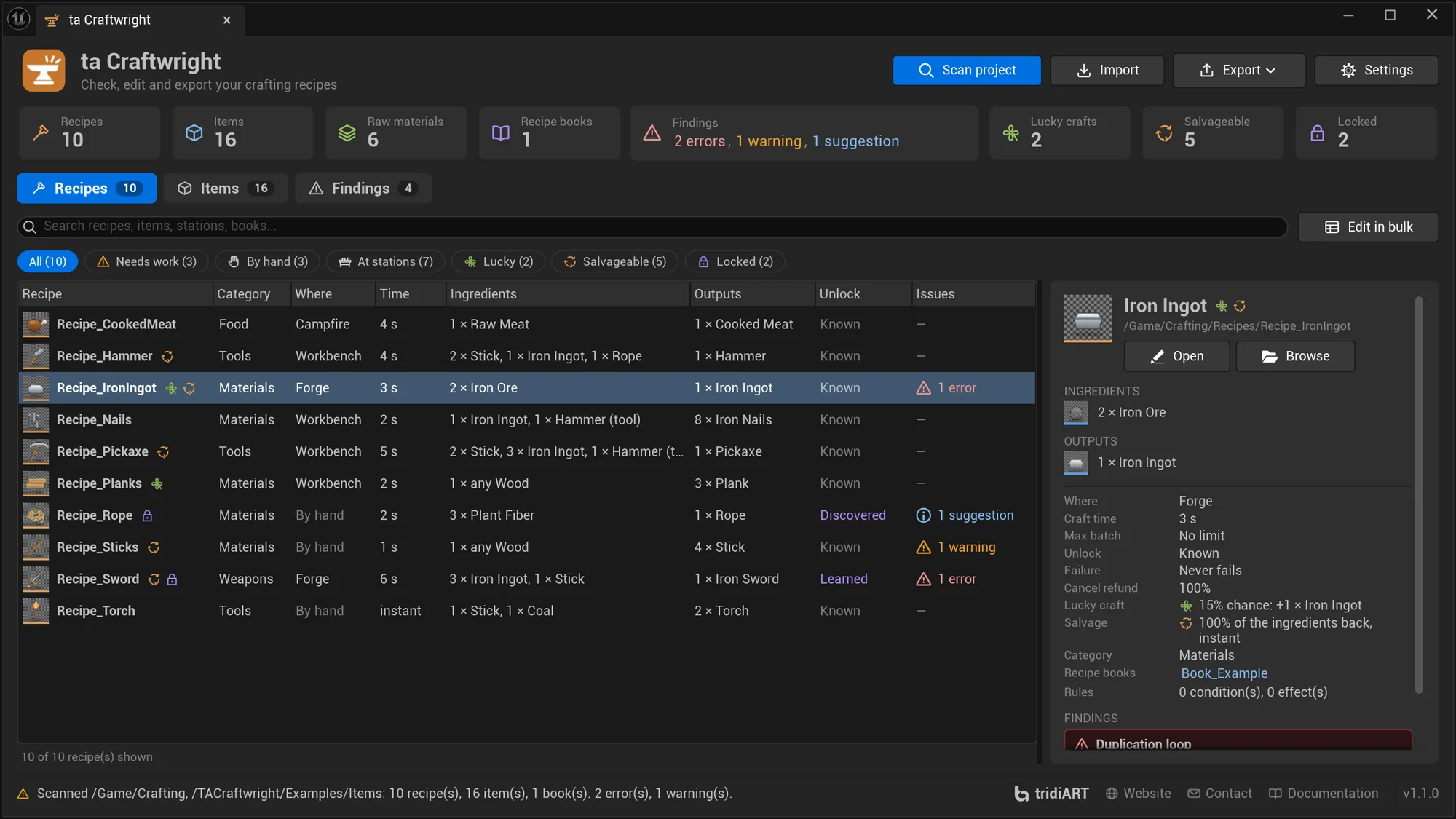
Header
Section titled “Header”Next to the title (ta Craftwright, “Check, edit and export your crafting recipes”) are four buttons:
| Button | What it does |
|---|---|
| Scan project | Scans the Scan Folders from the settings (by default /Game). |
| Import | Creates and updates recipes from a CSV or JSON file, after a review of every change. See Import and export. |
| Export | A menu: HTML report (writes it and opens it in the browser), CSV tables, JSON, Everything, and Open report folder. Available after a scan. See Exports. |
| Settings | Opens Project Settings > Plugins > ta Craftwright. |
Before the first scan, the panel shows what it does (Find broken recipes, Edit in bulk, Share and automate) and a Scan project button.
Summary
Section titled “Summary”After a scan, a row of tiles counts Recipes, Items, Raw materials (items that recipes use but no recipe makes: gathered, looted or bought), Recipe books and Findings (“2 errors, 1 warning, 1 suggestion”), then three tiles for recipes:
| Tile | Counts |
|---|---|
| Lucky crafts | Recipes with a Bonus Chance: a lucky craft makes more. |
| Salvageable | Recipes whose item can be salvaged back into materials. |
| Locked | Recipes that are not known from the start: learned or discovered. |
Click a tile to open the matching page and filter. Under the tiles, the Recipes, Items and Findings tabs show their counts.
Recipes
Section titled “Recipes”The Recipes page lists every scanned recipe.
- Search (Search recipes, items, stations, books…), across the panel with Edit in bulk next to it: matches the recipe’s name, display name, category, ingredients, outputs, stations and books.
- Filters: All, Needs work (recipes with errors or warnings), By hand, At stations, Lucky, Salvageable and Locked, each with its count.
- Columns: Recipe, Category (the last part of the tag, for example “Materials”), Where (by hand or the stations), Time, Ingredients, Outputs, Unlock and Issues. Click a column header to sort by it.
- Markers after the recipe’s name: a clover for a lucky craft (“Lucky craft: 15% chance”), arrows for a recipe that can be salvaged (“Can be salvaged”) and a lock for a recipe that is not known from the start (“Not known from the start: Learned”).
- Issues: the most severe finding in its colour, for example “1 error”, and “+N” for the others; “—” when there are none.
- Details of the selected recipe on the right: its display name with the same markers, its path, Open and Browse; INGREDIENTS and OUTPUTS with the items’ pictures; Where, Craft time, Max batch, Unlock, Failure (“10% chance, 0% refunded” or “Never fails”), Cancel refund, Lucky craft (“15% chance: +1 × Iron Ingot” or “Never”), Salvage (“50% of the ingredients back, 3 s per unit”, “Gives 2 × Scrap, instant” or “Cannot be salvaged”), Unlock hint (for locked recipes), Category, Recipe books (click one to list its recipes), Rules (the number of conditions and effects) and its FINDINGS.
- Under the list: “10 of 10 recipe(s) shown”. Double-click a recipe to open it.
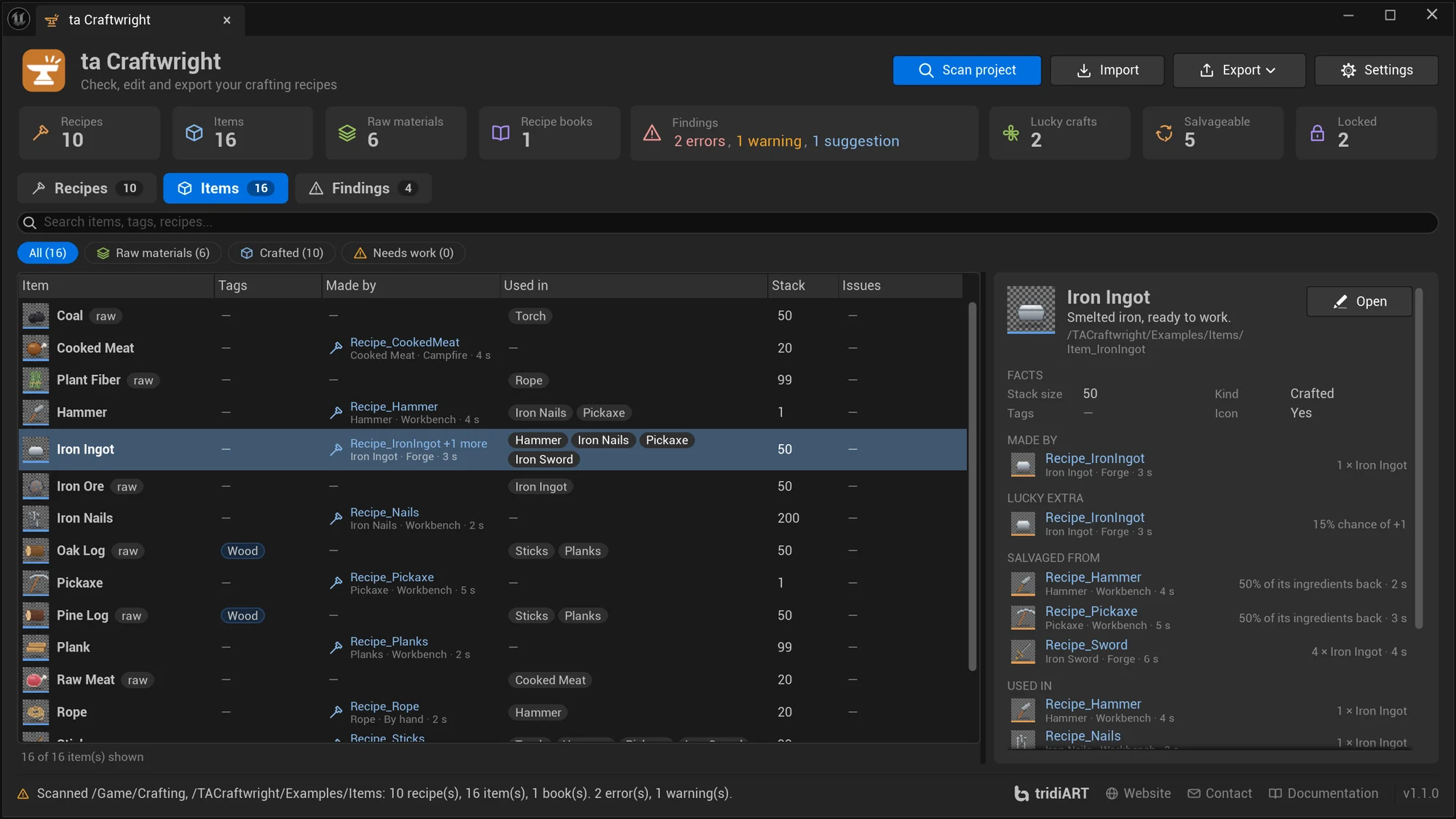
The Items page lists every item that the scanned recipes use or make, and every item in the scanned folders.
- Search (Search items, tags, recipes…): matches the item’s name, display name, tags and the recipes that make and use it.
- Filters: All, Raw materials, Crafted and Needs work, each with its count.
- Columns: Item (its display name; raw materials are marked raw), Tags (the last part, for example “Wood”), Made by (the recipe with what it makes, where and how long, for example “Iron Ingot · Forge · 3 s”, and “+1 more” when more recipes make it), Used in, Stack and Issues. Click a column header to sort by it.
- Details: the item’s name, description and path with Open; FACTS: Stack size, Kind (raw material, crafted, or not made or used by any recipe), Tags and Icon; then the recipes, each one a link that shows it:
| Section | For example | Lists |
|---|---|---|
| MADE BY | 1 × Iron Ingot | The recipes that make the item |
| LUCKY EXTRA | 15% chance of +1 | The recipes whose lucky crafts make it |
| SALVAGED FROM | 4 × Iron Ingot · 4 s, or 50% of its ingredients back · 3 s | The recipes whose salvage gives it back |
| USED IN | 3 × Iron Ingot, 1 × Hammer (tool), 1 × any Wood | The recipes that use it |
| SALVAGED INTO | 50% of 2 × Stick, 3 × Iron Ingot · 3 s | What salvaging the item gives back |
The lucky and salvage sections show only when they have recipes. The item’s findings come last.
Findings
Section titled “Findings”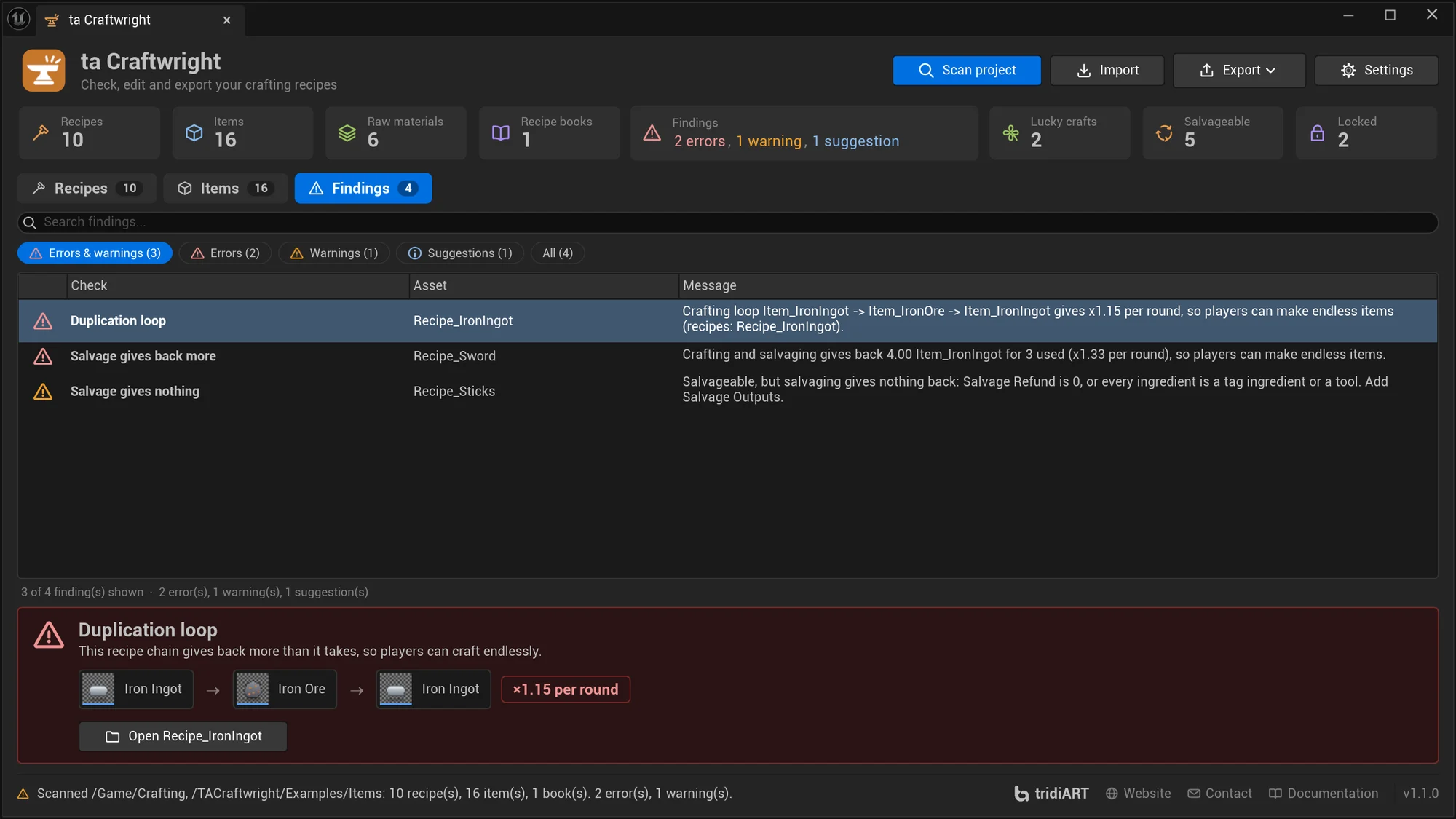
The Findings page lists every finding of the scan, errors first.
- Search (Search findings…): matches the asset name, the message and the check’s name.
- Filters: Errors & warnings (the default), Errors, Warnings, Suggestions and All, each with its count.
- Columns: the severity’s icon, Check, Asset and Message. Under the list: “3 of 4 finding(s) shown · 2 error(s), 1 warning(s), 1 suggestion(s)”.
- The card under the list explains the selected finding: its check, what it means, and for a duplication loop or a salvage that gives back more the items of one round, for example Iron Ingot → Iron Ore → Iron Ingot, with the gain, for example “×1.15 per round”. Findings about several recipes show them as links. Open opens the asset, for example “Open Recipe_IronIngot”.
- Double-click a finding to open its asset.
Narrow panel
Section titled “Narrow panel”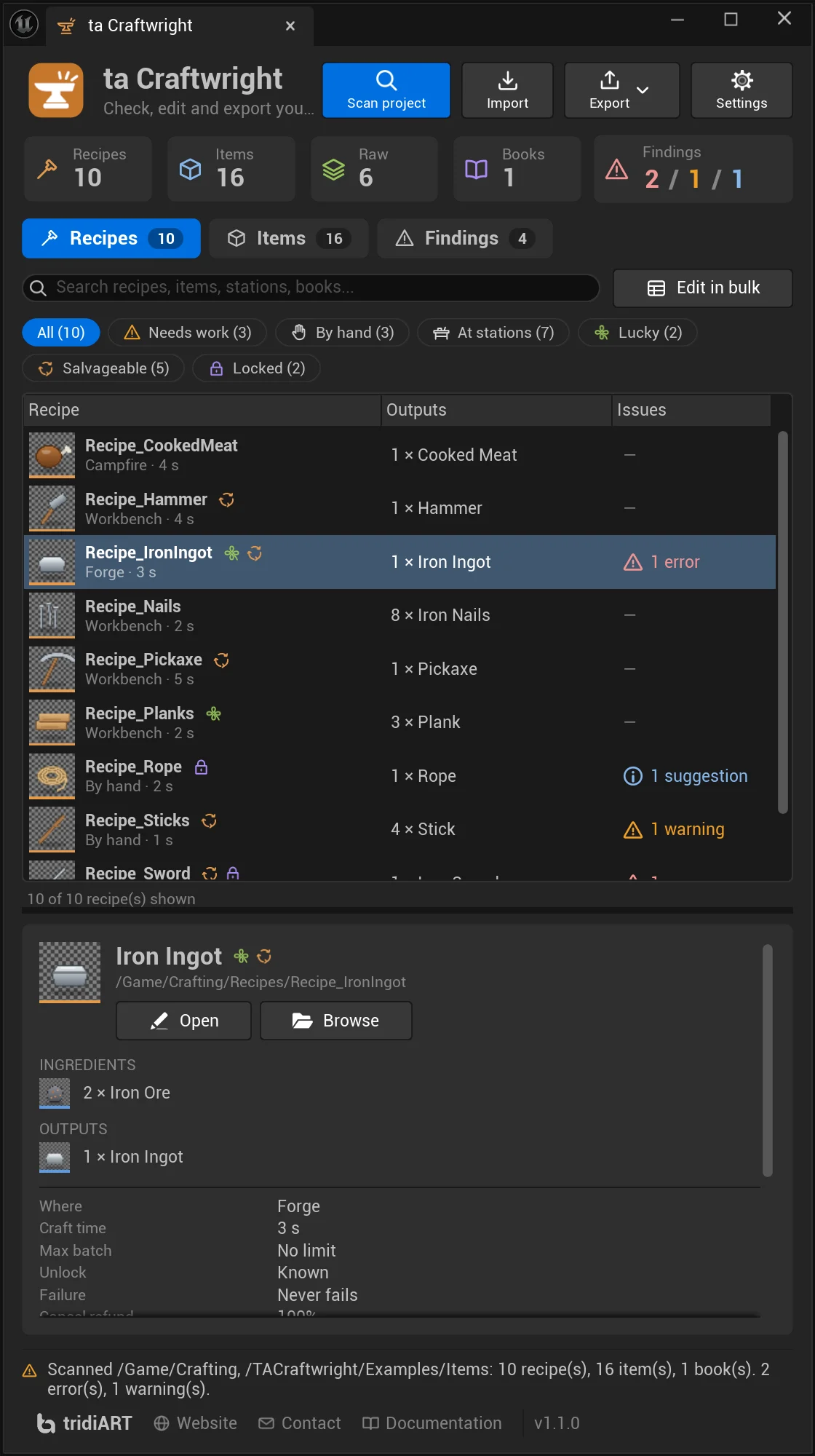
When the panel is narrower than 1000 units, for example docked next to the viewport, it switches by itself:
- The buttons show their icon with a small label under it.
- Five tiles, with short names (“Raw”, “Books”) and the findings as “2 / 1 / 1”. The Lucky crafts, Salvageable and Locked tiles are hidden; the filter chips have them too.
- The recipe table keeps Recipe (with where and how long under the name, for example “Forge · 3 s”), Outputs and Issues. On the Findings page, the asset goes under the check’s name.
- The details go under the list, and the status line gets a line of its own.
Narrower still, the buttons get a row of their own and the tabs wrap; at the narrowest the buttons and the small tiles show icons only.
Edit in bulk
Section titled “Edit in bulk”Edit in bulk on the Recipes page opens the selected recipes, or all recipes the list shows when none is selected, side by side in Unreal’s Property Matrix. Use it to compare and change craft times, batches, refunds or unlocks of many recipes at once. Select several recipes with Ctrl or Shift.
To balance recipes in a spreadsheet instead, export the CSV tables and import them again. See Import and export.
Automatic rescan
Section titled “Automatic rescan”When you change a Craftwright item, recipe or book (or a condition or effect inside a recipe) while the panel is open, the panel scans the same folders again shortly after, and keeps the selected recipe and item selected.
Status line
Section titled “Status line”The bottom of the panel shows the result of the last scan, for example:
Scanned /Game: 10 recipe(s), 16 item(s), 1 book(s). 0 error(s), 0 warning(s).and, in the footer, tridiART with links to the website, contact and this documentation, and the plugin’s version.
What a scan reads
Section titled “What a scan reads”A scan loads every Craftwright item, recipe and recipe book in the scanned folders and their subfolders. It also follows references out of those folders: books included by scanned books, the recipes in those books, the items those recipes use and make, and recipes taught by Learn Recipes effects. Items that only exist in other folders appear in the report too.
The checks need the whole picture (loops run across many recipes, and “not in a book” needs every book), so scan the folders that hold all your crafting data together.
Checks
Section titled “Checks”| Rule id | Name | Severity | About |
|---|---|---|---|
Duplication |
Duplication loop | Error | Recipes |
SalvageGain |
Salvage gives back more | Error | Recipe |
NoOutputs |
No outputs | Error | Recipe |
EmptyOutput |
Empty output | Error | Recipe |
EmptyIngredient |
Empty ingredient | Error | Recipe |
CannotDiscover |
Cannot be discovered | Error | Recipe |
UnknownTag |
Tag without items | Warning | Recipe |
NeverProduced |
Output never made | Warning | Recipe |
FreeRecipe |
Free recipe | Warning | Recipe |
AlwaysFails |
Always fails | Warning | Recipe |
SalvageNothing |
Salvage gives nothing | Warning | Recipe |
NotInBook |
Not in a recipe book | Warning | Recipe |
EmptyRule |
Empty condition or effect | Warning | Recipe |
EmptyBook |
Empty recipe book | Warning | Recipe book |
EmptyBookSlot |
Empty book entry | Warning | Recipe book |
Loop |
Crafting loop | Suggestion | Recipes |
NotTaught |
Not taught by a recipe | Suggestion | Recipe |
NoUnlockHint |
No unlock hint | Suggestion | Recipe |
NoIcon |
Item without icon | Suggestion | Item |
The rule id appears in the JSON report and in Python (rule_id). The name appears in the panel, the HTML report, the commandlet output and Data Validation. Suggestions have the severity Info in JSON and Python.
Messages name assets by their asset names, for example Item_IronOre; numbers are 1-based (ingredient 1 is the first ingredient).
Duplication loop
Section titled “Duplication loop”A chain of recipes that gives back more than it takes, so players can craft endlessly. For example, a forge smelts 2 Iron Ore into 1 Iron Ingot, and a scrap recipe turns 1 Iron Ingot into 3 Iron Ore: every round turns 2 ore into 3.
Crafting loop <item> -> <item> -> <item> gives x<factor> per round, so players can make endless items (recipes: <recipes>).Crafting loop Item_IronOre -> Item_IronIngot -> Item_IronOre gives x1.50 per round, so players can make endless items (recipes: Recipe_IronIngot, Recipe_ScrapIngot).How it is found:
- Every recipe with exactly one consumed ingredient is a step from that ingredient to each of its outputs and bonus outputs. A tag ingredient is a step from every item with the tag.
- A step’s rate is the expected output per input: output Count × output Chance, plus the expected share of lucky units (Bonus Chance × the bonus outputs, or the outputs once more), times (1 − Failure Chance), divided by the ingredient Count. Recipes that always fail are left out.
- Salvage is a step too: from a Salvageable recipe’s main output to each item that salvaging gives back, at the expected amount per item of the main output (before rounding).
- A loop of steps whose rates multiply to more than 1 is a duplication loop. The factor is shown with two decimals.
- Up to 16 different loops are reported. The finding is on one recipe of the loop and lists all of them.
The checks use the recipes’ own Bonus Chance; a crafter’s luck can make lucky crafts more likely in the game.
With salvage, one recipe can be a loop: Recipe_IronIngot smelts 2 Iron Ore into 1 Iron Ingot with a Bonus Chance of 0.15, and salvaging the ingot gives back all its ore (Salvage Refund 1). One round gives (1 + 0.15) ÷ 2 × 2 = ×1.15:
Crafting loop Item_IronIngot -> Item_IronOre -> Item_IronIngot gives x1.15 per round, so players can make endless items (recipes: Recipe_IronIngot).Recipes with two or more consumed ingredients aren’t part of this check, because players can’t loop them without the other ingredients; they show up as crafting loops instead, and their salvage is checked by Salvage gives back more.
Fix: lower the outputs of one step, or raise its inputs, so that no round gains items.
Salvage gives back more
Section titled “Salvage gives back more”Crafting one unit and salvaging what it makes gives back more of an ingredient than the unit used up: craft one, salvage it, and have more than before. Failed units’ refunds and the expected share of lucky crafts count. It checks salvageable recipes with two or more used-up ingredients; the others are part of the duplication loop check.
Crafting and salvaging gives back <amount> <item> for <n> used (x<factor> per round), so players can make endless items.Crafting and salvaging gives back 4.00 Item_IronIngot for 3 used (x1.33 per round), so players can make endless items.Fix: lower Salvage Refund or the Salvage Outputs.
No outputs
Section titled “No outputs”Makes nothing: add at least one output.Empty output
Section titled “Empty output”An output, bonus output or salvage output without an item.
Output <n> has no item.Bonus output <n> has no item.Salvage output <n> has no item.Empty ingredient
Section titled “Empty ingredient”An ingredient with neither an item nor a tag.
Ingredient <n> has no item and no tag, so the recipe can never be crafted.Cannot be discovered
Section titled “Cannot be discovered”A Discovered recipe without ingredients: discovery needs ingredients to look for.
Is unlocked by discovery but has no ingredients to discover it with.Tag without items
Section titled “Tag without items”A tag ingredient whose tag no scanned item has (also counting child tags).
No item has the tag <tag>, so ingredient <n> can never be met.Output never made
Section titled “Output never made”An output or bonus output with a Chance of 0, or Bonus Outputs with a Bonus Chance of 0.
Output <item> has a 0% chance and is never made.Bonus output <item> has a 0% chance and is never made.Has Bonus Outputs but a Bonus Chance of 0%, so they are never made.Free recipe
Section titled “Free recipe”A recipe with outputs but no consumed ingredient (only tools, or nothing).
Uses up no ingredients: it makes items from nothing.Always fails
Section titled “Always fails”Failure Chance is 100%: it never makes anything.Salvage gives nothing
Section titled “Salvage gives nothing”A Salvageable recipe whose salvage gives nothing back: Salvage Refund is 0, every used-up ingredient is a tag ingredient or a tool, or every Salvage Output has a 0 chance.
Salvageable, but salvaging gives nothing back: Salvage Refund is 0, or every ingredient is a tag ingredient or a tool. Add Salvage Outputs.Salvageable, but its Salvage Outputs never give anything (0% chance).Not in a recipe book
Section titled “Not in a recipe book”No scanned book reaches the recipe, directly or through included books, so no crafter can use it. Turn it off with Warn Recipes Not In Book.
Is in no recipe book, so no crafter can use it.Empty condition or effect
Section titled “Empty condition or effect”An empty entry in Conditions or Effects.
Condition <n> is empty.Effect <n> is empty.Empty recipe book
Section titled “Empty recipe book”A book without recipes, also counting its included books.
Has no recipes.Empty book entry
Section titled “Empty book entry”Empty entries in a book’s Recipes or Included Books.
Has <n> empty entry.Has <n> empty entries.Crafting loop
Section titled “Crafting loop”Items that can be crafted into each other, for example smelting ore into ingots and dismantling ingots into ore. That is often intended, so it is a suggestion: check that no round trip gains items. Loops that are already reported as duplication loops aren’t reported again.
<items> can be crafted into each other (recipes: <recipes>). Fine for smelting or dismantling, but check that no round trip gains items.Not taught by a recipe
Section titled “Not taught by a recipe”A Learned recipe that no Learn Recipes effect teaches. Fine when your game code calls Learn Recipe for it (scrolls, trainers, quests). Turn it off with Suggest Untaught Recipes.
Must be learned, and no Learn Recipes effect teaches it. Make sure your game calls Learn Recipe for it.No unlock hint
Section titled “No unlock hint”A Learned or Discovered recipe without an Unlock Hint. Crafting menus that show locked recipes then use their general text for the unlock type; see Unlock hints in the menu. Turn it off with Suggest Unlock Hints.
Is not known from the start and has no Unlock Hint, so menus that show locked recipes use a general text.Item without icon
Section titled “Item without icon”Turn it off with Suggest Item Icons.
Has no icon for the crafting UI.Data Validation
Section titled “Data Validation”Craftwright registers a validator with Unreal’s Data Validation plugin, which is enabled with Craftwright. With Run During Data Validation on, the checks run for Craftwright items, recipes and books wherever Unreal runs Data Validation: Validate Assets in the Content Browser, validate on save (if enabled in your project), and changelist validation.
Because loops and books need the whole project, validating an asset scans the Scan Folders (one scan is shared by all assets validated in the same frame). An asset outside those folders is added to that scan. Each asset gets the findings that are about it:
[ta Craftwright] <Check name>: <Message>[ta Craftwright] Not in a recipe book: Is in no recipe book, so no crafter can use it.| Craftwright severity | Data Validation message | Validation result |
|---|---|---|
| Error | Error | The asset fails validation |
| Warning | Warning | The asset passes, with a warning |
| Suggestion | Info | The asset passes |
Findings below Min Validation Severity (default Warning) are not reported, so suggestions stay out of Data Validation unless you lower it to Info.
Settings
Section titled “Settings”Open Edit > Project Settings > Plugins > ta Craftwright, or click Settings in the panel. The settings are stored in your project’s Config/DefaultEditor.ini, so the whole team shares them through source control.
| Setting | Category | Default | Meaning |
|---|---|---|---|
| Scan Folders | Scan | Empty (/Game) |
Content folders scanned by Scan project, the commandlet without -Paths, scan_project in Python, and Data Validation. |
| Warn Recipes Not In Book | Checks | On | Report Not in a recipe book. |
| Suggest Untaught Recipes | Checks | On | Report Not taught by a recipe. |
| Suggest Item Icons | Checks | On | Report Item without icon. |
| Suggest Unlock Hints | Checks | On | Report No unlock hint. |
| Run During Data Validation | Data Validation | On | Run the checks when assets are validated. |
| Min Validation Severity | Data Validation | Warning | Findings below this severity are not reported by Data Validation: Info, Warning or Error. |
| New Recipe Folder | Files | /Game/Craftwright/Recipes |
Where imports create new recipes, and where rows without a path are looked up. |
| Report Directory | Files | Saved/Craftwright/Reports |
Where reports and exports are written. Relative paths start at the project folder. |