
Crafting
All crafting goes through the player’s Craftwright Crafter component: it checks a craft, sends the request to the server, takes the ingredients and adds a job to its own queue (hand crafting) or to a station’s queue. This page describes that flow. Stations have their own page: Stations and fuel.
Crafter functions
Section titled “Crafter functions”| Function | Returns | What it does |
|---|---|---|
| Check Craft (Recipe, Count = 1, Station = none) | A check (FTACraftwrightCheck) with Result, Reason and Max Count |
Answers “can Count units be crafted now?” without crafting. Works on clients; use it for the UI. |
| Get Max Craftable (Recipe, Station = none) | Integer | How many units the current ingredients are enough for (the Max Count of Check Craft). |
| Request Craft (Recipe, Count = 1, Station = none) | Result | Crafts Count units: by hand when Station is none, at Station otherwise. |
| Request Cancel (Job Id, Station = none) | Nothing | Cancels a job in the crafter’s queue (Station none), or a job this crafter started at Station. |
| Request Collect Tray (Station = none) | Nothing | Moves the tray of the crafter (Station none) or of Station into the crafter’s output inventory. |
| Get Available Recipes (Station = none) | Array of recipes | The known recipes that can be made by hand (Station none) or at that station. |
| Get Locked Recipes (Station = none) | Array of recipes | The recipes of the crafter’s books that it doesn’t know yet and that are made there: for locked entries in menus. |
| Get All Recipes | Array of recipes | Every recipe in the crafter’s recipe books. |
| Get Ingredient Status (Recipe, Count = 1, Station = none) | Array of ingredient statuses | Every ingredient with the amount Count units need and the amount the crafter has (from its own inventories, plus the station’s when given). See Tracking recipes. |
| Get Ingredient Sources (Station = none) | Array of inventories | Every inventory ingredients are taken from. See Where ingredients come from. |
A hand recipe (one without Stations) always uses the crafter’s own queue, even when a station is passed. A station recipe needs a station.
The crafter’s salvage and tracking functions are described in Salvage and Tracking recipes.
On the server and on clients
Section titled “On the server and on clients”- On the server (and in single player), Request Craft checks and crafts at once and returns Success, or the failing result and fires On Request Failed with the reason.
- On a client, it runs the same check locally. If the check fails, it returns that result and fires On Request Failed with the reason. If it passes, it sends the request to the server and returns Requested. The server checks everything again; if the server turns the request down, On Request Failed fires on the owning client with the server’s reason.
Request Salvage works the same way. Request Cancel, Request Collect Tray, Track Recipe and Untrack Recipe always run on the server; on a client they only send the request. See Multiplayer.
Results and failure reasons
Section titled “Results and failure reasons”Check Craft and Request Craft check these in order and stop at the first that fails. Reason is the readable text, also passed to On Request Failed, and Get Result Text returns the same text for any result.
| Result | Reason | When |
|---|---|---|
| Invalid Recipe | No recipe selected. | No recipe was given. |
| Invalid Count | That amount cannot be crafted at once. | Count is below 1, or above the recipe’s Max Batch. |
| Unknown Recipe | You do not know this recipe yet. | The crafter doesn’t know the recipe. See Unlocks. |
| Not Enough Uses | Not enough uses left on this blueprint. | The recipe was learned with limited uses, and fewer are left than Count. |
| Needs Station | This recipe needs a crafting station. | A station recipe was requested without a station. |
| Wrong Station | This station cannot craft it. | The station’s Station Tag isn’t one of the recipe’s Stations or a child of one. |
| Out Of Range | Too far from the station. | The crafter is farther from the station than its Interaction Range. |
| Condition Failed | The condition’s reason, or “Requirements not met.” | One of the recipe’s Conditions isn’t met. |
| Queue Full | The crafting queue is full. | The recipe takes time, and the queue it would go into (the crafter’s for hand recipes, the station’s otherwise) already holds Max Jobs jobs. Instant recipes skip this check. |
| Missing Ingredients | Not enough ingredients. | The ingredient sources don’t hold enough for Count units, or a tool is missing. |
| Success | Crafting. | The craft was accepted (server and single player). |
| Requested | Request sent. | The request passed the local check and was sent to the server (client). |
| Not Allowed | Not allowed. | The crafter has no owner, or a Request Cancel at a station was for another crafter’s job, or the crafter was out of range. |
| Not Salvageable | This cannot be salvaged. | Request Salvage or Check Salvage for a recipe that isn’t Salvageable. See Salvage. |
Request Collect Tray at a station out of range reports Out Of Range through On Request Failed.
How many can be made
Section titled “How many can be made”Max Count (and Get Max Craftable) is the largest number of units the ingredient sources are enough for right now, whatever Count you asked for:
- It looks only at ingredients and tools: it is the largest count for which the same allocation as a real craft works (specific items first, tag ingredients from what is left, tools still present), counting every ingredient source, at a station including the station’s.
- It is at most
9999, and at most the recipe’s Max Batch when that is set. - For a recipe learned with limited uses, it is at most the uses left.
- It doesn’t look at range, conditions or queue space. A recipe can show “Can make 5” and still fail with Out Of Range or Queue Full.
- It is
0when a tool is missing.
The example menu shows it as “Can make 5” in the recipe list and uses it for the Max button.
Where ingredients come from
Section titled “Where ingredients come from”Ingredients can come from several inventories at once. Get Ingredient Sources lists them in this order, without duplicates:
- The crafter’s own inventories, when Auto Find Inventories is on (the default): inventories on the crafter’s owner, then on its pawn or controller, then on the player state. An inventory is an actor or component that implements the Craftwright Inventory interface.
- Extra sources added with Add Inventory Source.
- Shared containers near the crafter: inventories registered as shared (a built-in inventory with Share With Nearby Crafting on, or anything registered with Register Shared Inventory) whose actor is within the crafter’s Nearby Container Radius (default
0, off). The distance is measured from the crafter’s pawn, or from its owner when there is no pawn. - At a station, the station’s sources:
- inventories on the station actor (fuel, storage),
- inventories on the station’s Linked Actors,
- shared containers within the station’s Pull Radius of the station actor.
So at a station the crafter uses its own bags and the station’s storage, chests and nearby storage together.
How ingredients are taken
Section titled “How ingredients are taken”When a craft is accepted, Craftwright decides what to take for all Count units before it removes anything:
- Specific consumed items are set aside first, because they can’t be replaced by anything else.
- Tag ingredients are filled from what is left, taking the matching items in the alphabetical order of their asset paths.
- Tools must still be there after that. They are needed once per job and are not taken.
Then each item is removed from the sources in the order above: from the first source until it runs out, then from the next. If any removal fails, everything already removed is put back and the craft fails with Missing Ingredients, so a craft never takes half its ingredients.
Ingredients are taken when the job is queued, not when each unit starts. A queued job can’t lose its ingredients, and the same items can’t be spent twice. What a job took is remembered for refunds.
If the recipe has conditions, their On Craft Started runs right after the ingredients are taken (for costs such as stamina). Limited recipe uses are spent at the same moment.
Instant recipes
Section titled “Instant recipes”A recipe with a Craft Time of 0 is instant. Request Craft makes all Count units right away instead of queueing a job:
- every unit still rolls its failure chance and output chances, runs its effects and fires On Crafted;
- the outputs go where a queued job’s would go (at a station, according to its Output Mode);
- there is no job, so Queue Full isn’t checked and On Job Finished doesn’t fire;
- at a station, instant recipes don’t burn fuel and don’t check Is Powered.
The example’s Torch is instant.
Queues
Section titled “Queues”The crafter and every station have a queue. Hand recipes go into the crafter’s queue, station recipes into the station’s queue. A station’s queue is shared by every player who uses the station and keeps running when they walk away.
| Property | Default | Meaning |
|---|---|---|
| Max Jobs | 8 |
The most jobs in the queue at once. |
| Crafting Speed | 1 |
Speed multiplier for new jobs (2 = twice as fast). At least 0.01. |
| Max Offline Seconds | 0 |
The longest offline time simulated when a save is loaded; 0 = no limit. See Save games. |
One request makes one job of Count units. Jobs run one after another; the first job in the queue works, the others wait. A job makes its units one after another, and each unit is delivered as soon as it is done.
| Job state | Meaning |
|---|---|
| Queued | Waiting behind other jobs. |
| Working | At the front of the queue and making progress. |
| Paused | At the front of the queue but unable to work: a station without fuel or power. See Fuel. |
A job (FTACraftwrightJob) has Job Id, Recipe, Count (units ordered), Completed (units finished), Unit Duration (seconds per unit), State, Salvage (the job salvages instead of crafting) and Instigator (the crafter that ordered it; empty after loading a save for station jobs).
Crafting speed
Section titled “Crafting speed”The Unit Duration is the recipe’s Craft Time divided by the speed:
| Where | Speed |
|---|---|
| By hand | The crafter’s Get Crafting Speed: its Crafting Speed, or an attribute with the GAS crafter |
| At a station | The station’s Get Station Speed (its Crafting Speed), times the crafter’s Get Crafting Speed when the station’s Use Crafter Speed is on. See Speed. |
Salvage jobs use the recipe’s Salvage Time instead of Craft Time. Speed is fixed when a job is queued, so saves and offline time keep it. Units take at least 0.01 seconds.
Get Crafting Speed and Get Station Speed can be overridden in Blueprint or C++, for skills, perks or upgrades.
Queue functions
Section titled “Queue functions”| Function | Returns |
|---|---|
| Get Jobs | Every job, in order |
| Find Job (Job Id) | True and the job when it is in the queue |
| Has Jobs, Is Queue Full | Booleans |
| Get Unit Progress (Job Id) | Progress of the unit being made, 0 to 1 (0 for waiting jobs). Smooth on clients. |
| Get Job Progress (Job Id) | Progress of the whole job, 0 to 1 |
| Get Job Time Remaining (Job Id) | Seconds until the job is done, counting the jobs ahead of it. Ignores fuel. |
| Get Tray | The items waiting in the tray |
| Cancel Job (Job Id) | Server only: cancels a job and refunds it. From clients, use the crafter’s Request Cancel. |
| Collect Tray (Target Inventory) | Server only: moves tray items into an inventory; returns how many moved. |
| Advance Time (Seconds) | Server only: runs the queue forward. Ticking calls it; use it yourself for catch-up or tests. |
The queue ticks only on the server, and only while it has jobs.
Cancelling
Section titled “Cancelling”Request Cancel (Job Id, Station) cancels a job:
- without a station, a job in the crafter’s own queue;
- with a station, a job this crafter ordered at that station, while the crafter is within the station’s Interaction Range. Jobs restored from a save have no instigator and can be cancelled by any crafter in range.
The job is removed and Cancel Refund (default 1, everything) of the ingredients of its unfinished units comes back, rounded down per item. The unit in progress counts as unfinished: its progress is lost. Limited recipe uses spent on the job don’t come back. See Failure and refunds.
Cancelling a salvage job gives back the items it hasn’t salvaged yet.
Outputs and the tray
Section titled “Outputs and the tray”Outputs go to the crafter’s output inventory first, then its other inventories and the sources added with Add Inventory Source; only what fits nowhere waits in the tray (Request Collect Tray moves it into the output inventory). Refunds follow the same order. Stations can also keep results in their own tray (Output Mode).
Every finished unit delivers its outputs right away:
- Hand crafting: into the crafter’s output inventory, then its other own inventories, then its extra sources, as far as they have room (Get Room For). Only what fits nowhere goes into the crafter’s tray.
- At a station with Output Mode To Crafter (the default): the same, into the inventories of the crafter who ordered the job; only what fits nowhere goes into the station’s tray. When that crafter is gone (the player left, or the job was restored from a save), everything goes into the station’s tray.
- At a station with Output Mode To Station Tray: everything waits in the station’s tray.
Refunds (cancelled jobs and failed units) follow the same order and always go back to the crafter who ordered the job, whatever the output mode; only what fits nowhere goes into the tray.
The output inventory is the one set with Set Output Inventory, or by default the first of the crafter’s own inventories (then the first extra source). Get Output Inventory returns it.
Request Collect Tray moves a tray into the crafter’s output inventory; what doesn’t fit stays in the tray. At a station the crafter must be within Interaction Range.
Lucky crafts
Section titled “Lucky crafts”A recipe’s Bonus Chance (under Outcome) is the chance that a successful unit is lucky and also makes its Bonus Outputs. When Bonus Outputs is empty, a lucky unit makes its outputs once more. See Lucky crafts for the recipe fields.
The crafter’s Get Crafting Luck multiplies the chance: its Crafting Luck (default 1; 2 = lucky twice as often), or an attribute with the GAS crafter. Override Get Crafting Luck in Blueprint or C++ for skills and perks. Like speed, luck is fixed per job when it is queued, so saves and offline time keep it.
A lucky unit’s extra items are part of its outputs: they go where outputs go, and On Crafted lists them. On Bonus Outputs fires right after On Crafted with only the extra items, for “Lucky!” messages.
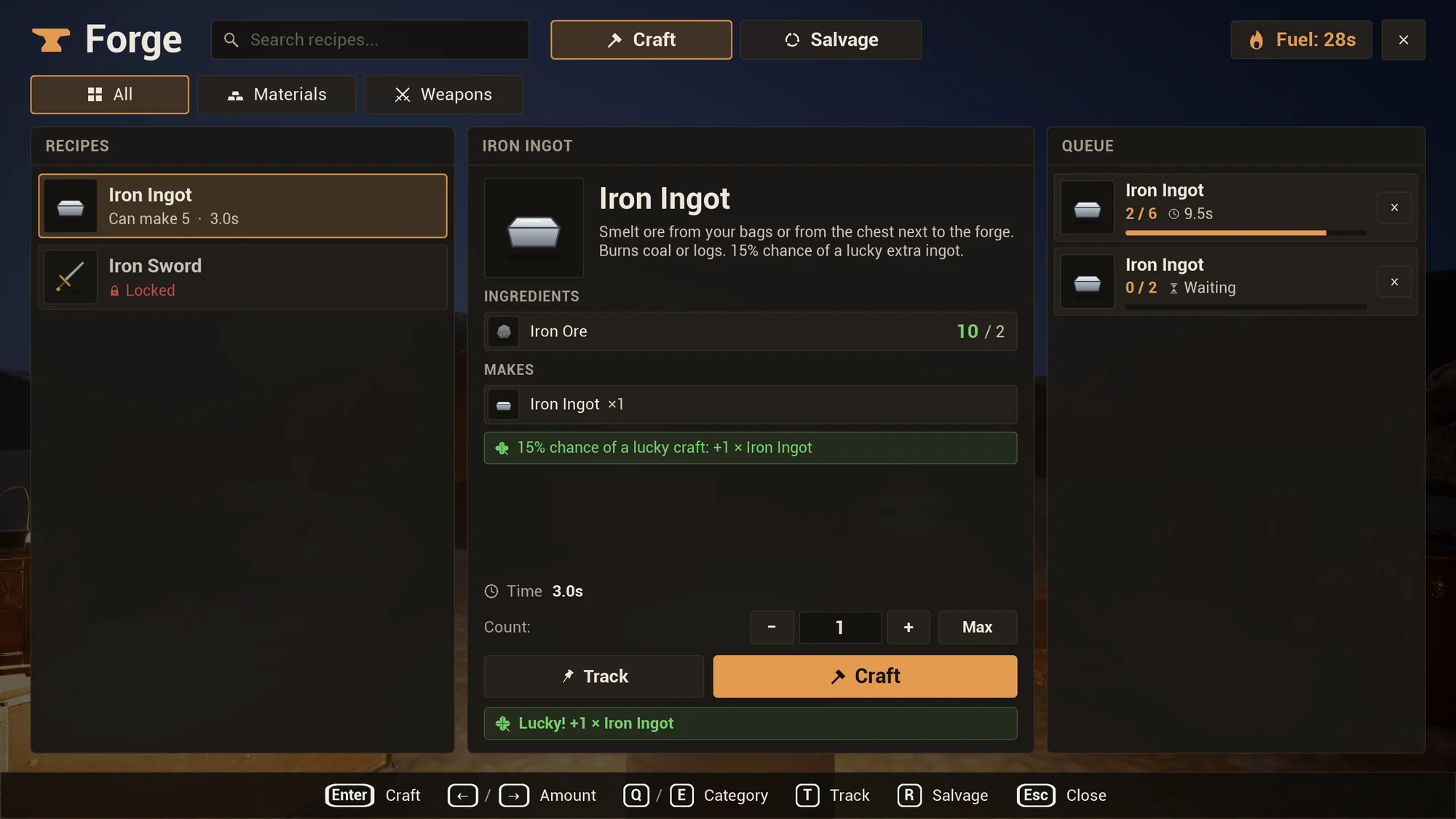
In the example, Planks have a Bonus Chance of 0.1 (a lucky unit makes 3 more Planks) and Iron Ingots 0.15.
Salvage
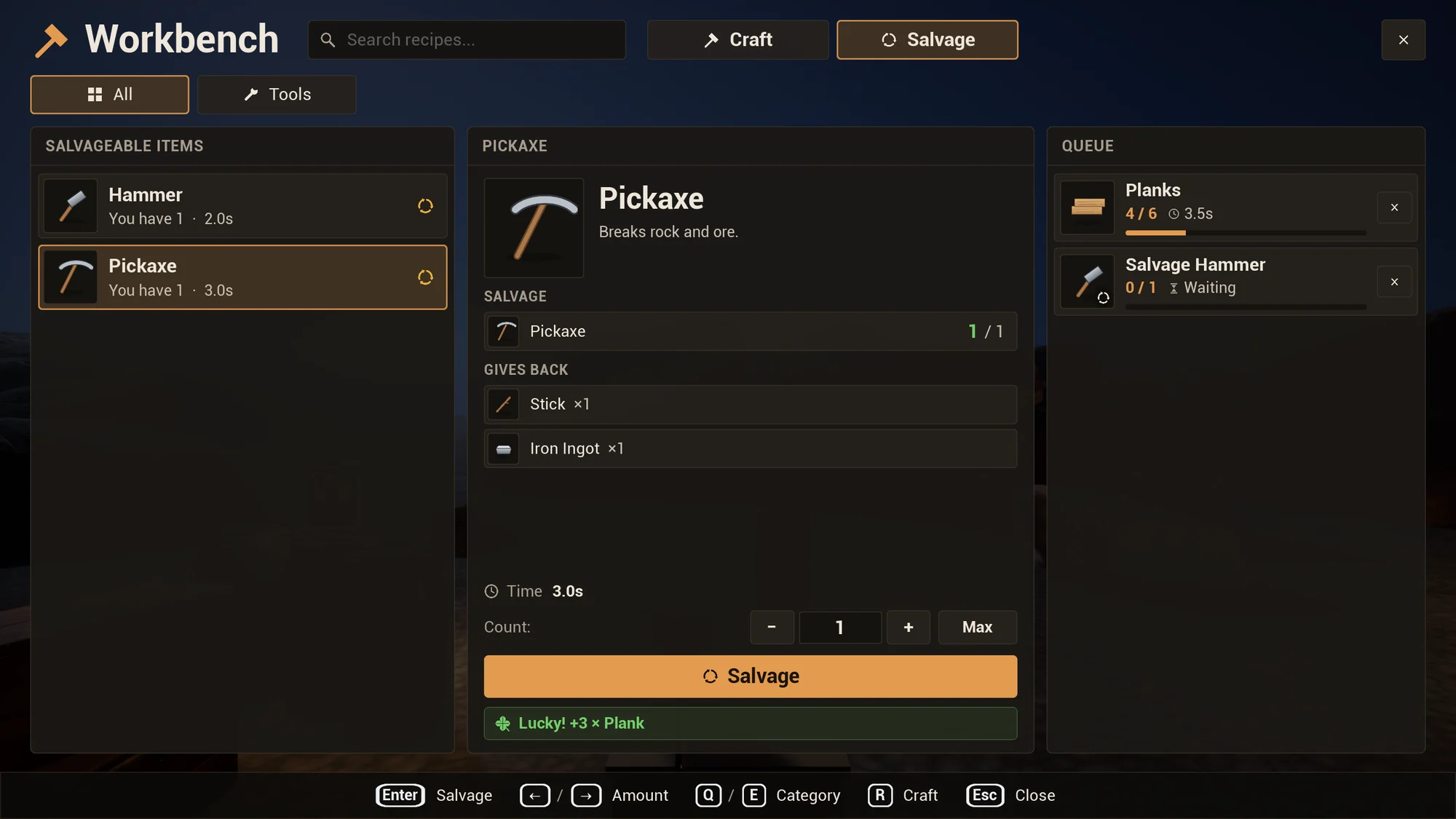
Section titled “Salvage”A Salvageable recipe’s main output (its first output, in its count per unit) can be taken apart with Request Salvage, where the recipe is made: by hand or at its stations. It gives back Salvage Refund of the used-up ingredients that name an item, rounded down over the batch (tag ingredients and tools are not given back), or the Salvage Outputs you set (scrap, rare parts). See Salvage for the recipe fields.
| Function | Returns | What it does |
|---|---|---|
| Check Salvage (Recipe, Count = 1, Station = none) | A check with Result, Reason and Max Count | Can Count units of the main output be salvaged now? Works on clients; use it for the UI. |
| Get Max Salvageable (Recipe, Station = none) | Integer | How many units the crafter holds to salvage: the main output items divided by the output’s count. |
| Request Salvage (Recipe, Count = 1, Station = none) | Result | Salvages Count units: by hand in the crafter’s queue, or at Station. On the server it runs at once; on a client it checks locally and sends the request (Requested). |
| Get Salvage Recipes (Station = none) | Array of recipes | The salvageable recipes of the crafter’s books (or known) whose output can be salvaged there: by hand when Station is none, else at that station. |
- Check Salvage fails with Not Salvageable for a recipe that can’t be salvaged, and with Missing Ingredients and the reason “Not enough items to salvage.” when the crafter holds too few items. Station recipes need their station within range, like crafting.
- The items to salvage are taken from the ingredient sources when the request is accepted, like ingredients.
- Salvage Time
0is instant. Otherwise salvage jobs queue like crafts, at the speed of the queue, and cancelling one gives the unsalvaged items back. - What a salvaged unit gives back goes where outputs go. See Outputs and the tray.
In the example, the Hammer and the Pickaxe can be salvaged at the Workbench and the Iron Sword at the Forge, each with a Salvage Refund of 0.5. A Pickaxe (2 Stick, 3 Iron Ingot and a Hammer as tool) gives back 1 Stick and 1 Iron Ingot; two Pickaxes give back 2 Sticks and 3 Iron Ingots, because the rounding is over the whole batch.
Tracking recipes
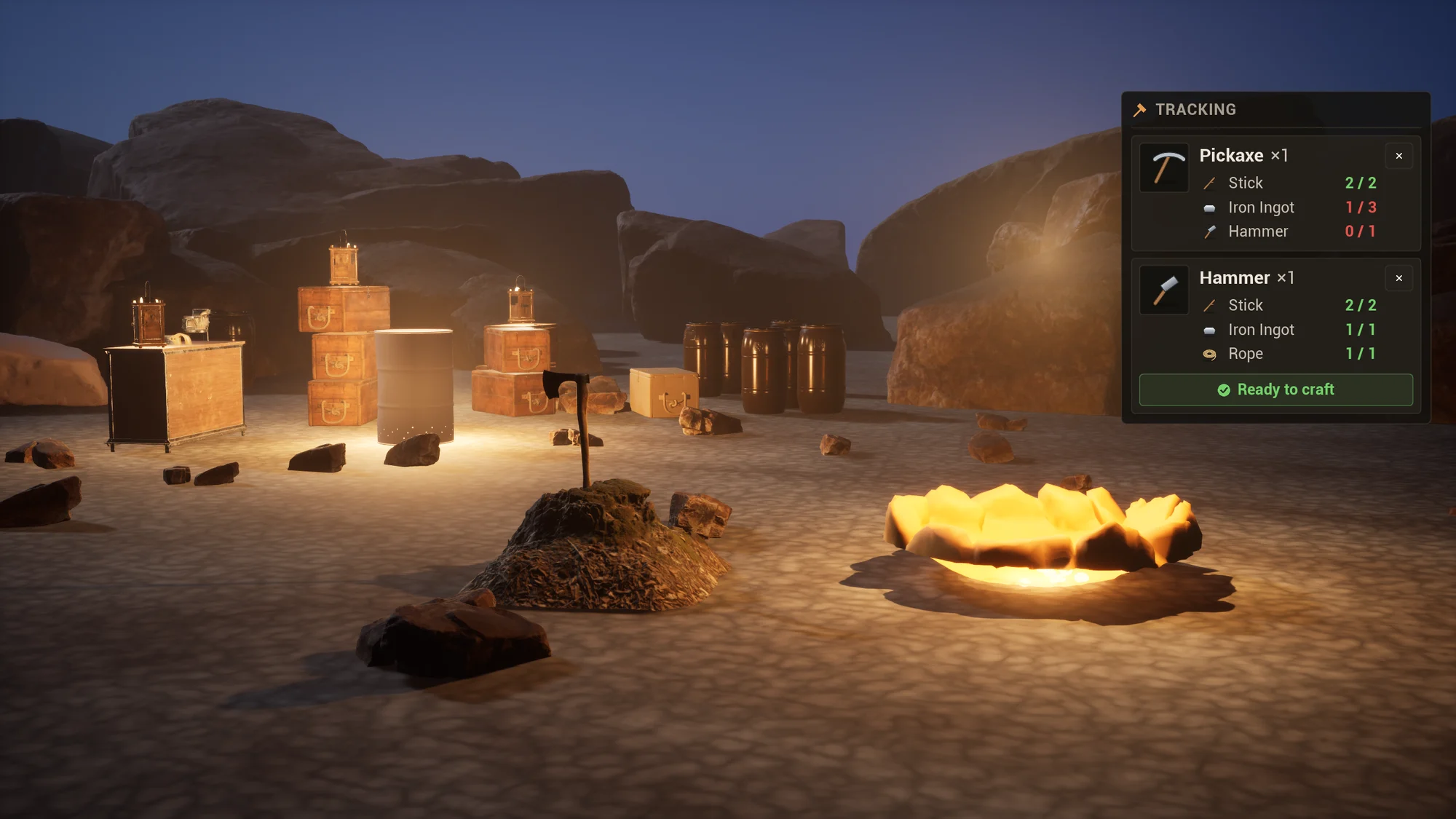
Section titled “Tracking recipes”Track Recipe pins a recipe, and how many to make, for a HUD. Get Ingredient Status lists what is needed and held for each ingredient. Tracked recipes replicate to the owner, are saved with the crafter, and count down (then stop) as the recipe is crafted.
| Function | What it does |
|---|---|
| Track Recipe (Recipe, Count = 1) | Tracks a recipe for Count units. Tracking it again sets the count. |
| Untrack Recipe (Recipe) | Stops tracking it |
| Is Recipe Tracked (Recipe) | True while it is tracked |
| Get Tracked Recipes | The tracked recipes, oldest first, each with Recipe and Count |
| Get Ingredient Status (Recipe, Count = 1, Station = none) | Each ingredient with Item, Item Tag (tag ingredients), Need (for Count units; tools once), Have and Tool |
| Property | Category | Default | Meaning |
|---|---|---|---|
| Max Tracked Recipes | Tracking | 3 |
The most recipes tracked at once; tracking another one drops the oldest. 0 = no tracking. |
| Untrack When Crafted | Tracking | On | Stop tracking a recipe once its tracked amount has been crafted (queued). |
Only recipes in the crafter’s recipe books (or learned) can be tracked. On Tracked Recipes Changed fires when the list changes. The example HUD shows the tracked recipes with WBP_CraftingTracker; see HUD tracker.
Events
Section titled “Events”| Event | On | Fires on | Parameters |
|---|---|---|---|
| On Crafted | Crafter | Server and owning client, after every unit (also instant ones, and station jobs this crafter ordered) | Crafter, Recipe, Outputs (empty when the unit failed), Succeeded |
| On Bonus Outputs | Crafter | Server and owning client, after On Crafted of a lucky unit | Crafter, Recipe, Items (the extra items, also in the outputs of On Crafted) |
| On Salvaged | Crafter | Server and owning client, after every salvaged unit | Crafter, Recipe, Items (what the unit gave back) |
| On Recipe Learned | Crafter | Server | Crafter, Recipe |
| On Recipes Changed | Crafter | Server and owning client: known recipes or uses changed | Crafter |
| On Tracked Recipes Changed | Crafter | Server and owning client: tracked recipes changed | Crafter |
| On Request Failed | Crafter | Owning client and server: a request was turned down | Crafter, Result, Reason |
| On Queue Changed | Crafter, Station | Server and clients: jobs added, started, paused, a unit finished, jobs ended | Queue |
| On Job Finished | Crafter, Station | Server: a job made all its units | Queue, Job |
| On Job Cancelled | Crafter, Station | Server: a job was cancelled | Queue, Job |
| On Tray Changed | Crafter, Station | Server and clients | Queue |
| On Inventory Changed | Built-in inventory | Server and clients: its contents changed | Inventory |
On Crafted reports the outputs the unit made, before they are delivered, so it also lists items that went into a tray.
Library functions
Section titled “Library functions”The function library UTACraftwrightLibrary (Blueprint category Craftwright) has helpers for your own UI and game code:
| Function | Returns |
|---|---|
| Is Inventory (Object) | True when the object implements Craftwright Inventory |
| Find Inventories (Actor) | The actor and its components that implement Craftwright Inventory |
| Count Item (Inventories, Item) | The total count of an item across inventories |
| Get All Items (Inventories) | Everything in the inventories, merged per item |
| Get Max Units (Recipe, Inventories, Limit = 9999) | How many units the inventories are enough for (ingredients and tools only) |
| Register Shared Inventory, Unregister Shared Inventory | Lets crafters and stations within their radius take ingredients from any inventory |
| Find Item For External (External, Id) | The Craftwright item mapped to another system’s item. See Mapping your items. |
| Get Server Time | The server’s world time, the same on server and clients |
| Get Result Text (Result) | The readable text of a result, as in the table above |
| Recipe Matches Search (Recipe, Search) | True when every word of Search is in the recipe’s name, the names of its outputs or ingredients (tag ingredients: the tag’s last part) or its category. Case doesn’t matter; an empty search matches everything. |
| Get Tag Short Name (Tag) | The last part of a tag, for labels: Recipe.Category.Weapons gives “Weapons” |
| Format Duration (Seconds) | Readable time: 4.0s below 10 seconds, 36s up to a minute (rounded up), 1m 05s, and 1h 05m from an hour |