

Readiness per target
One click on a target shows how many meshes are ready for it, the triangles it actually renders (its first loaded LOD), the budget used and where LOD 1 takes over on that device.
See which static and skeletal meshes are over the triangle budget of Steam Deck, Switch 2, Meta Quest or mobile, which need LODs, and whether Nanite or LODs fit each platform. Then build LOD chains in batch with switch distances in metres and fewer draw calls far away, preview every change and undo it from a backup.
Interactive demo with the plugin's real 1.1 scan of its test project. Pick a target and a mesh, check the findings, then go to Batch LODs: preview, apply, restore.
Every target has a triangle budget per mesh (and one per skeletal mesh), a count above which a mesh needs LODs, its own camera and the platform key its settings are written to. These are the defaults; change them or add your own in Project Settings or a shared settings asset.
| Target | Budget | LODs above | Skeletal budget | Skeletal LODs above | Nanite | Platform key | Camera | Distance scale |
|---|---|---|---|---|---|---|---|---|
| PC | 300,000 | 20,000 | 100,000 | 15,000 | On | None | 90° | 1 |
| Steam Deck | 100,000 | 5,000 | 50,000 | 8,000 | Off | Linux | 90° | 0.8 |
| Switch 2 | 60,000 | 3,000 | 40,000 | 6,000 | Off | None | 90° | 0.7 |
| Meta Quest | 20,000 | 1,000 | 20,000 | 3,000 | Off | Android | 104° per eye | 0.6 |
| Mobileoff by default | 15,000 | 1,000 | 15,000 | 2,500 | Off | Mobile | 90° | 0.5 |
Steam Deck writes to Linux; set it to None if you ship the Windows build through Proton. Switch 2 needs its platform SDK for a key. Meta Quest writes to Android, which is why Mobile starts off.
Unreal switches LODs by screen size, which is a different distance for every mesh and every camera. You set metres; LOD Tailor works out the screen sizes for each mesh's size, so a pebble and a building switch at the same distance, and each target gets its own, scaled to how far you look on that device.
Props and architecture: four LODs out to 80 m. LOD 1: 50% at 15 m · LOD 2: 25% at 35 m · LOD 3: 10% at 80 m
LOD 0LOD 1LOD 2LOD 3
Small items that are only seen up close. LOD 1: 40% at 6 m · LOD 2: 15% at 15 m
LOD 0LOD 1LOD 2
Big or important meshes that stay detailed far away. LOD 1: 60% at 30 m · LOD 2: 35% at 70 m · LOD 3: 15% at 150 m · LOD 4: 5% at 300 m
LOD 0LOD 1LOD 2LOD 3LOD 4
Strong reduction early, for mobile and standalone VR. LOD 1: 35% at 8 m · LOD 2: 12% at 20 m · LOD 3: 4% at 45 m
LOD 0LOD 1LOD 2LOD 3
Skeletal meshes: four LODs out to 45 m, two bone influences from LOD 2. LOD 1: 50% at 8 m, 4 bone influences · LOD 2: 25% at 20 m, 2 bone influences · LOD 3: 10% at 45 m, 2 bone influences
LOD 0LOD 1LOD 2LOD 3
Skeletal meshes for mobile and standalone VR: strong reduction early, fewer bone influences. LOD 1: 35% at 5 m, 2 bone influences · LOD 2: 15% at 12 m, 2 bone influences · LOD 3: 6% at 30 m, 1 bone influences
LOD 0LOD 1LOD 2LOD 3
ta LOD Tailor 1.1 in Unreal Engine 5.8, on a trial project with 21 static and skeletal meshes.
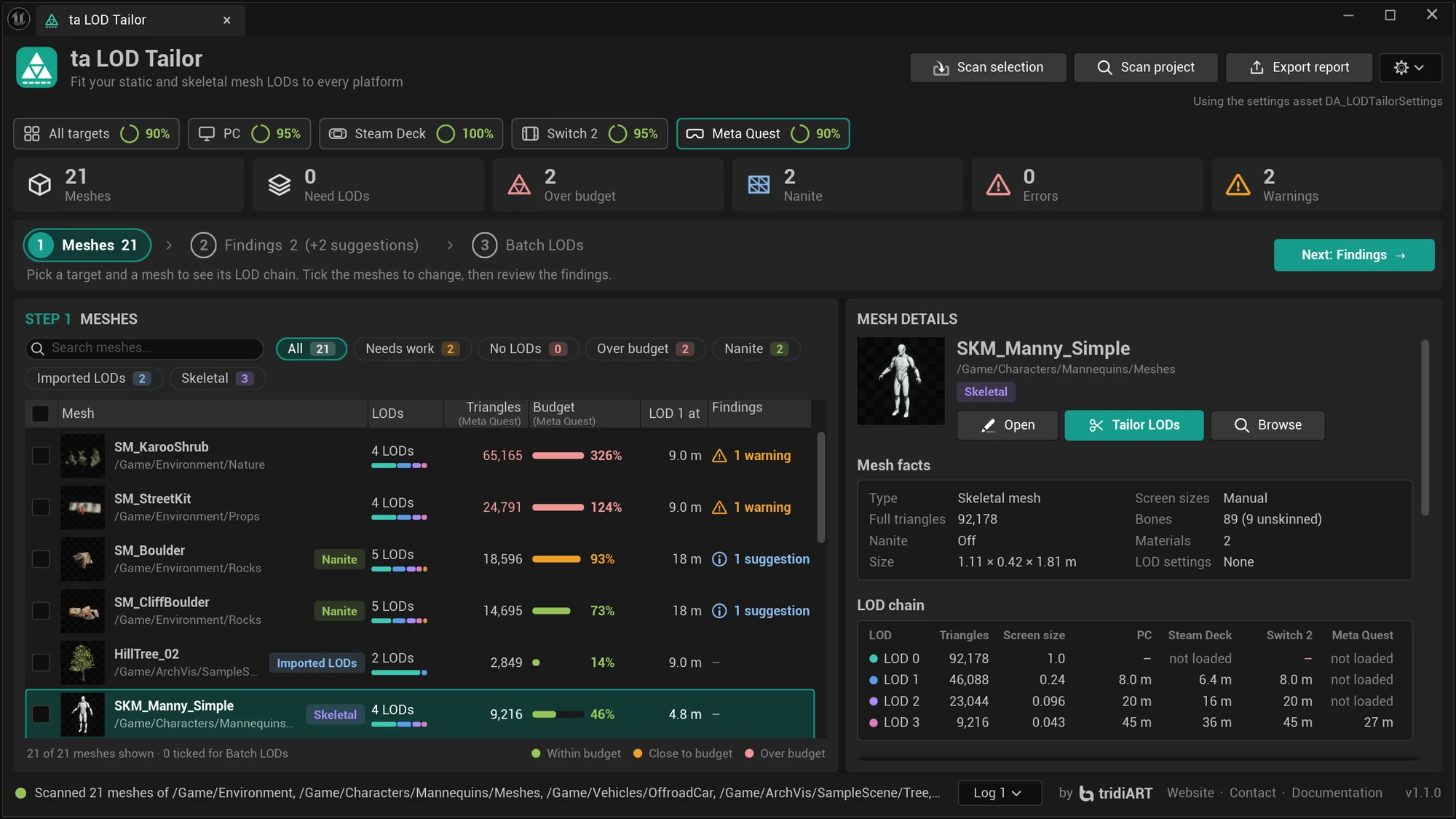
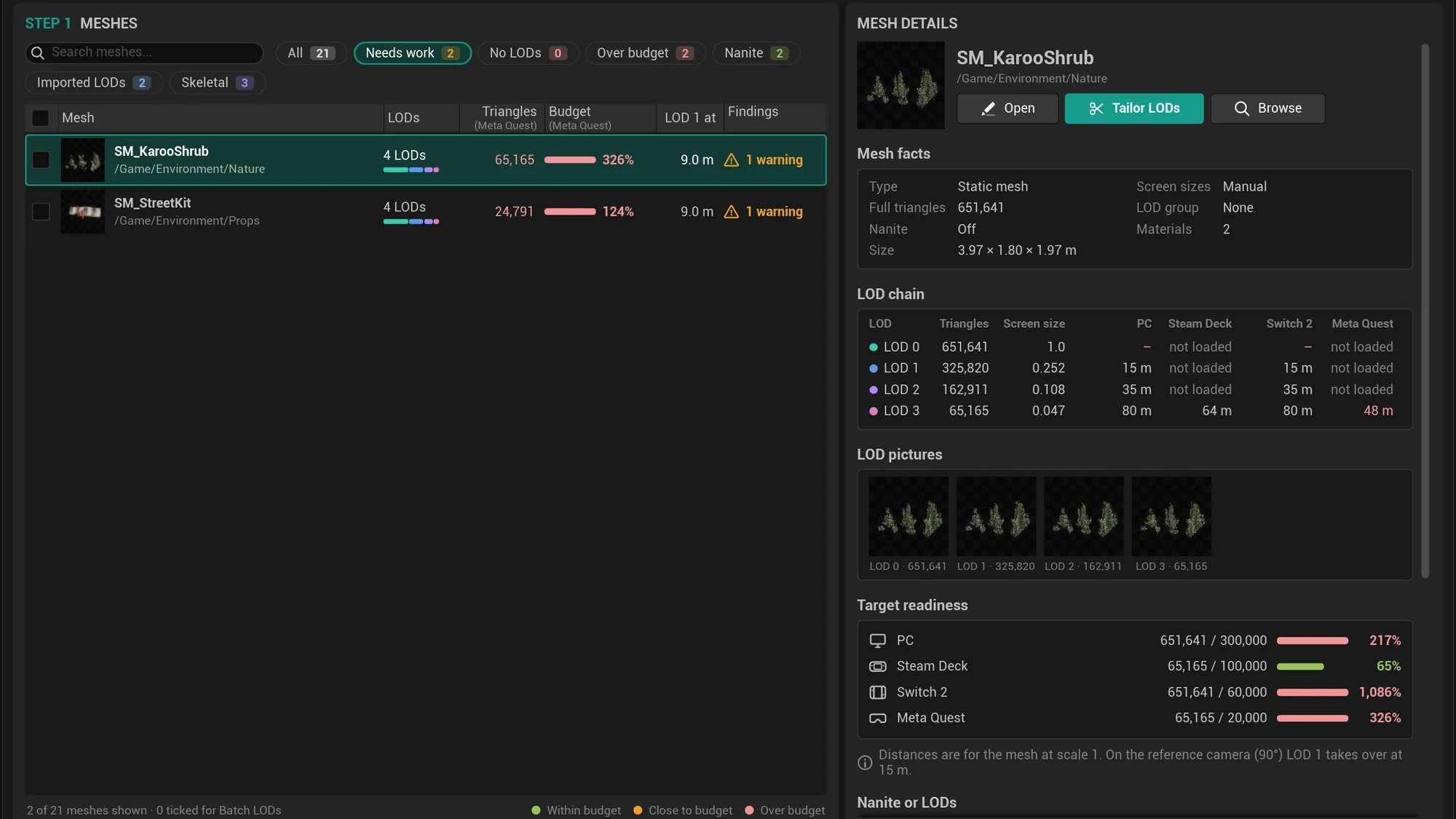
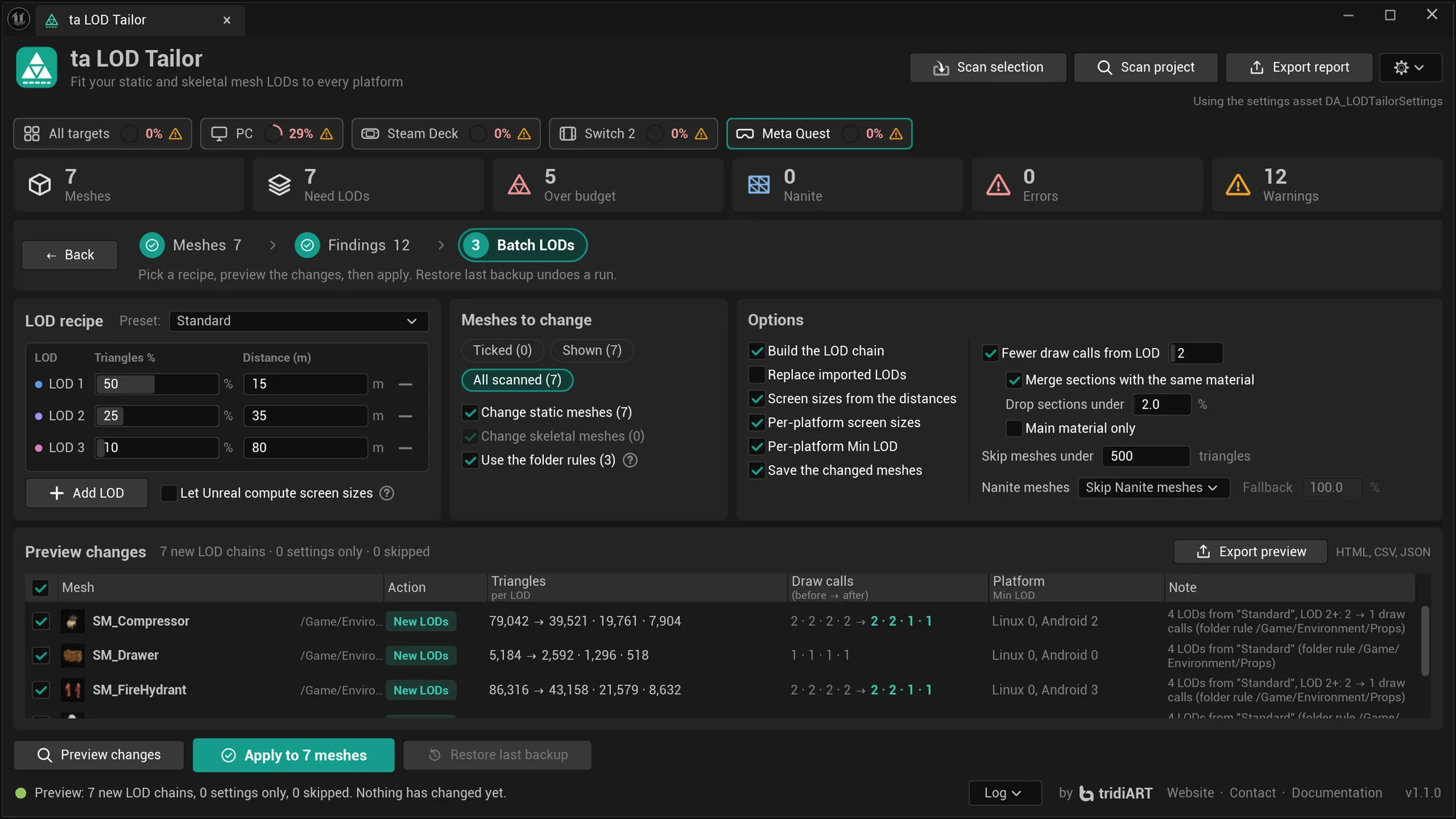
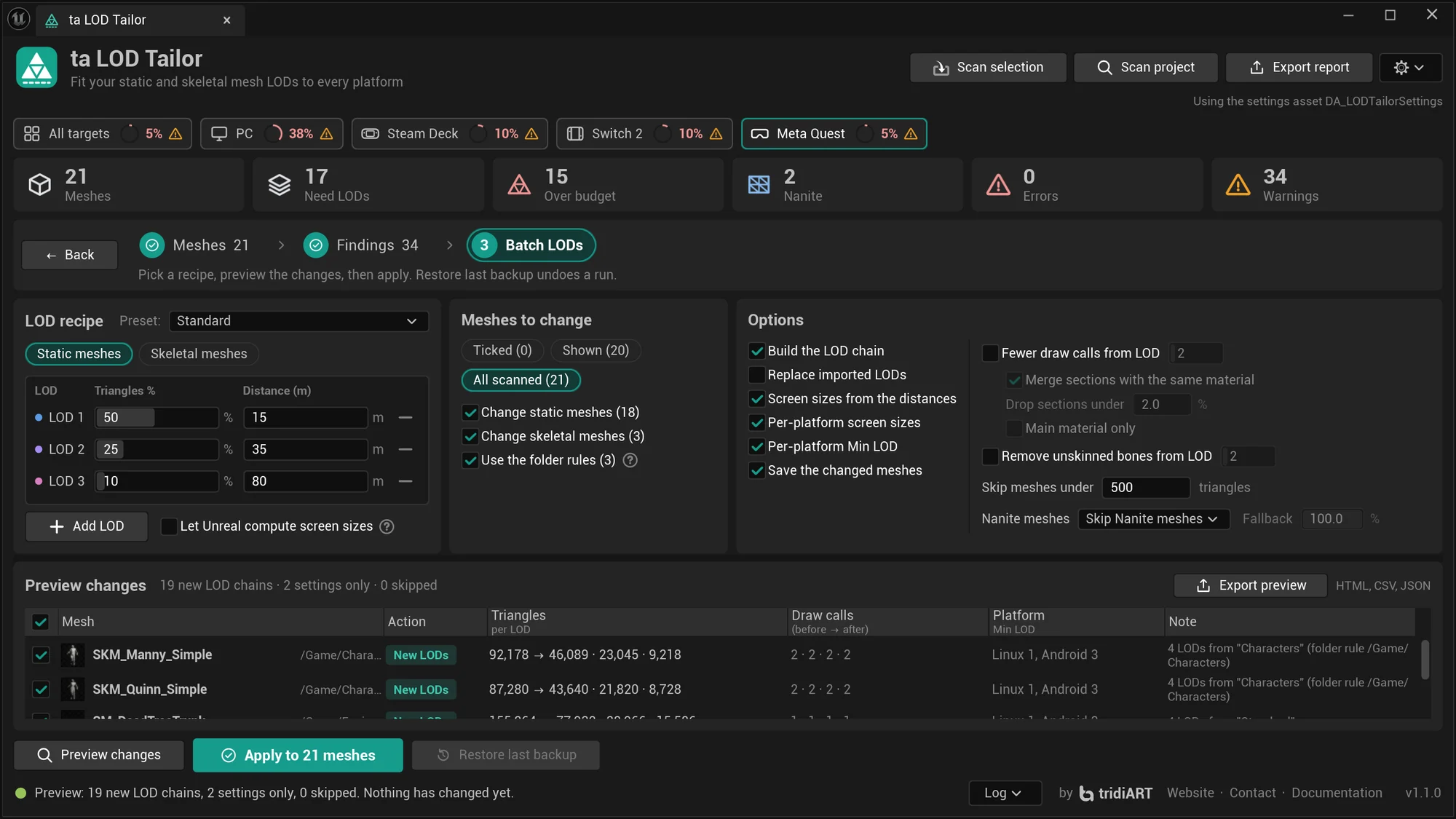
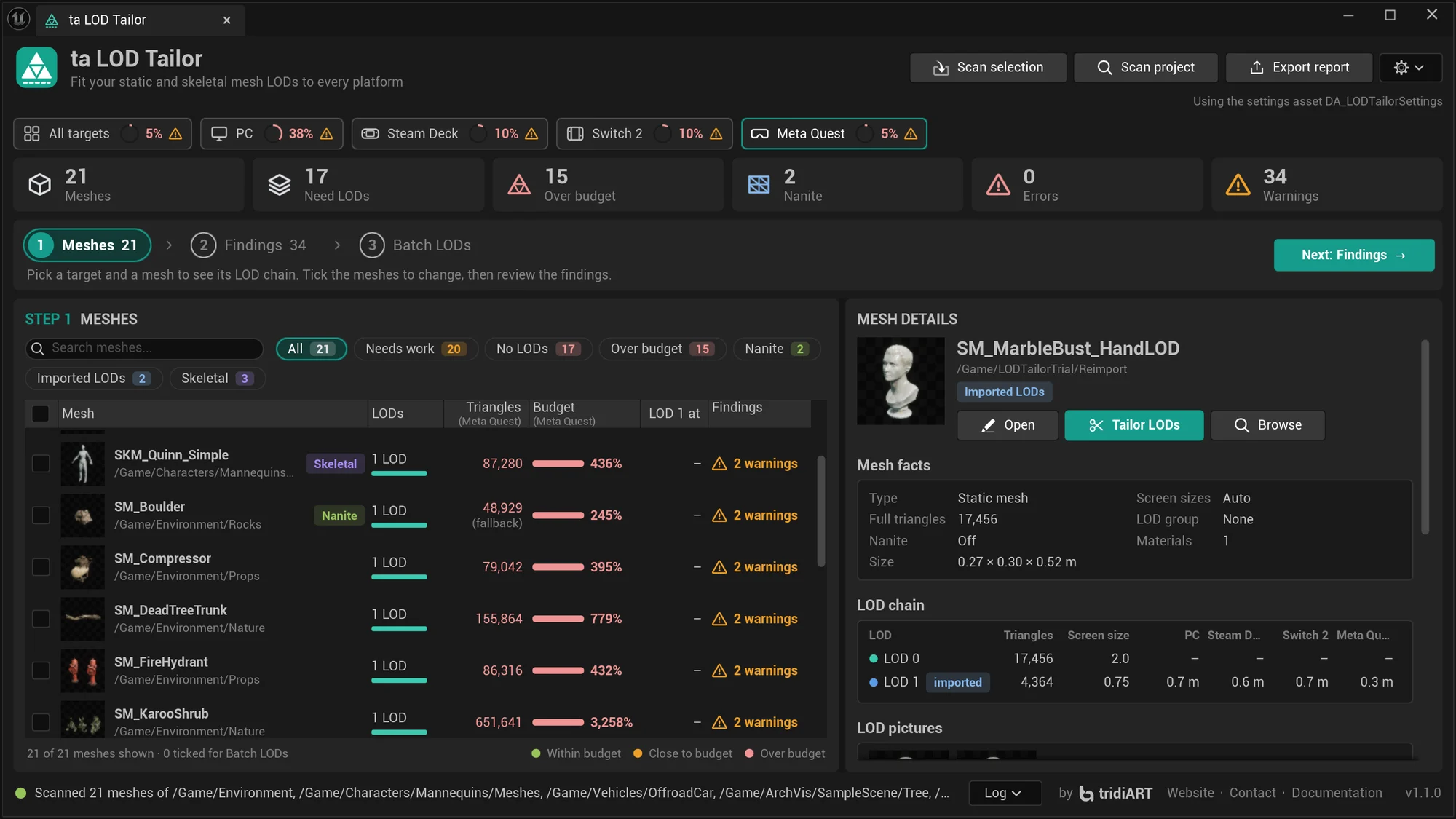
One click on a target shows how many meshes are ready for it, the triangles it actually renders (its first loaded LOD), the budget used and where LOD 1 takes over on that device.
Characters and creatures get their own triangle budgets per target and their own presets with bone influences per LOD. The far LODs can drop the bones no vertex is skinned to.
Standard, Small props, Hero / large, Mobile aggressive, Characters or your own recipe: triangle share and switch distance per LOD, for hundreds of meshes at once.
A verdict per mesh and target, with the reason: Keep Nanite, Nanite + fallback LODs, Switch to LODs, Keep LODs or Consider Nanite, the Nanite data next to a LOD chain's memory, and the multi-material fallback risk.
From a LOD you choose, sections with the same material merge, tiny sections drop, or the main material draws everything. The preview shows the draw calls per LOD before and after.
Every LOD side by side from the same camera, with its triangles and draw calls, in the mesh details and in the HTML report.
Fixed per target, or the first LOD within the target's triangle budget, so Meta Quest never loads the 57,000-triangle LOD 0.
Imported LODs keep their geometry and only get screen sizes and platform settings. If a reimport drops them, LOD Tailor asks to put them back, or does it right away: one Ctrl+Z step.
Targets, presets and folder rules in a settings asset you check in, or as JSON between projects. A folder rule gives a folder its own preset, in batch runs and on import.
Preview shows every mesh's new LOD count, triangles, draw calls and Min LOD before anything changes; untick what you want to leave out. Apply backs up first; one click restores.
HTML (sortable, light and dark), CSV and JSON. The commandlet fails the build on warnings or errors and can apply presets. Python and Blueprint for your pipeline; Data Validation runs the checks on save.
For static and skeletal meshes, in the panel, in Data Validation (Validate Assets and on save) and in the commandlet. Each finding lists the targets it applies to.
| Check | What it finds | Severity |
|---|---|---|
Over budgetOverBudget | The triangles a target renders (its first loaded LOD) are above its budget; skeletal meshes have their own budgets. | Warning |
No LODsNoLODs | A mesh without reduced LODs is above the target's "Require LODs Above" count. | Warning |
Nanite fallbackNaniteFallback | A Nanite mesh on a target without Nanite: only the fallback mesh is drawn, at every distance. | Warning, Info with LODs |
Nanite fallback materialsNaniteMaterials | Material sections of a multi-material Nanite mesh go missing on its fallback mesh or fallback LODs. | Warning, Info as a check |
Invalid Min LODInvalidMinLOD | Min LOD for a platform points past the last LOD. | Error |
Screen size orderScreenSizeOrder | Screen sizes set by hand do not get smaller from LOD to LOD, so a LOD is never shown. | Warning |
Weak reductionWeakReduction | A LOD keeps more than 85% of the previous LOD's triangles: memory without a gain. | Info |
No platform keyNoPlatformKey | A target without a platform key starts the mesh over its budget although a lighter LOD fits: only its key lets a batch run start it there. | Info |
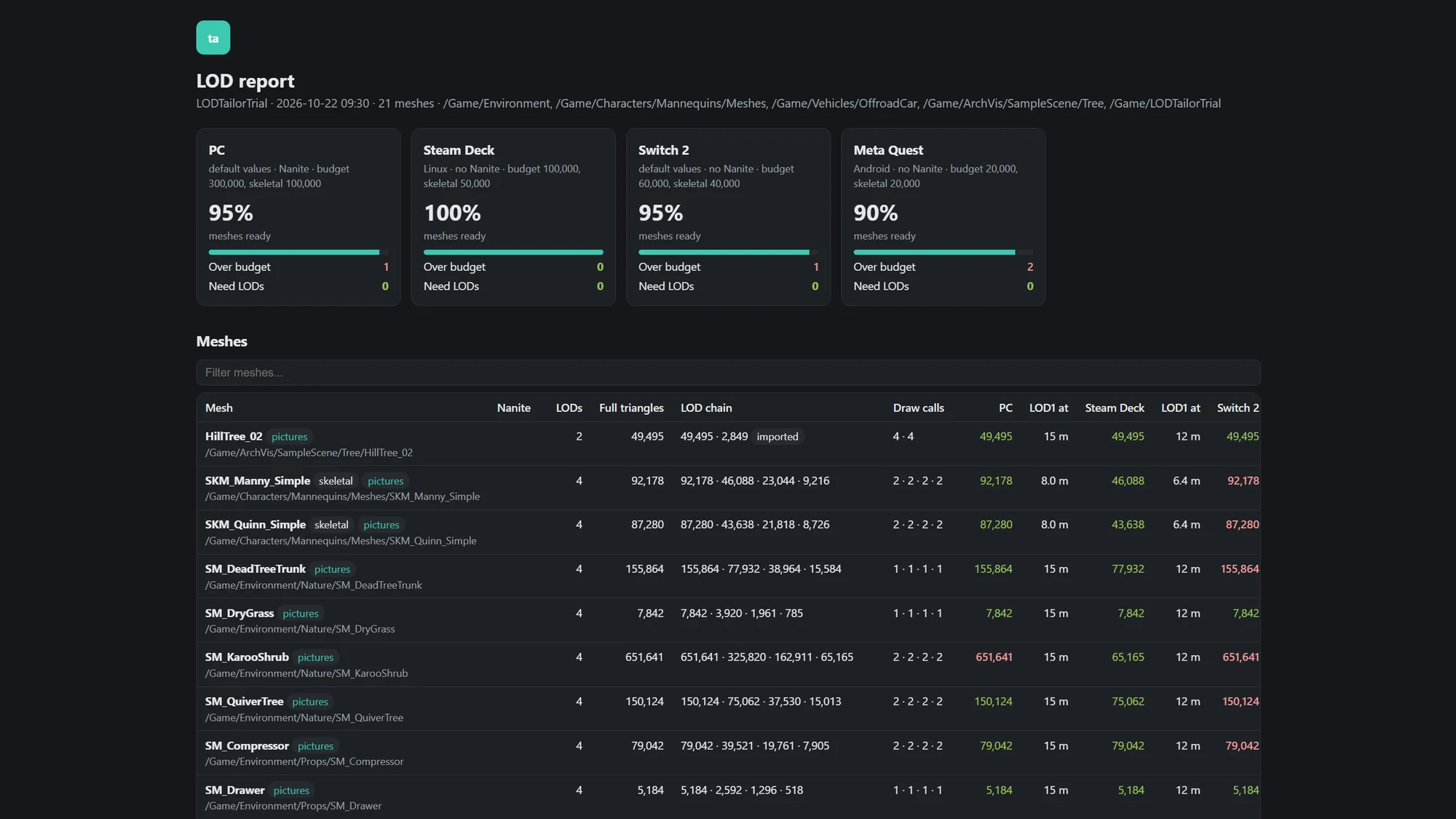
The real HTML report LOD Tailor 1.1 exported from its test project: readiness per target, every mesh with its LOD chain, LOD pictures, Nanite or LODs and the findings, in one file. Sort, filter, and switch your system to dark mode.
Also in the export: lod_report.csv and lod_report.json.
Run the commandlet on every build to catch a mesh that breaks a platform budget, or apply a preset to a whole folder from a script.
Command line docsUnrealEditor-Cmd.exe MyGame.uproject -run=TALODTailor ^
-Paths=/Game/Props+/Game/Env ^
-FailOn=Warning
rem Static and skeletal presets, Nanite kept for PC, fewer draw calls far away:
UnrealEditor-Cmd.exe MyGame.uproject -run=TALODTailor ^
-Paths=/Game -Apply -Preset=Standard -SkeletalPreset=Characters ^
-Nanite=Keep -ReduceDrawCalls -DrawCallsFromLOD=2import unreal
tailor = unreal.get_editor_subsystem(unreal.TALODTailorSubsystem)
report = tailor.scan_paths(["/Game/Props"])
for issue in report.issues:
print(issue.severity, issue.rule_id, issue.message, list(issue.targets))
options = tailor.make_apply_options("Standard")
options.nanite_mode = unreal.TALODTailorNaniteMode.KEEP_NANITE
options.reduce_draw_calls = True
plan = tailor.plan(report, [], options) # dry run
result = tailor.apply(plan) # backs up first
# tailor.restore_backup(result.backup_file)Sold on Fab under the Fab Standard License. Both licenses get the same plugin: every feature and the full C++ source, for Unreal Engine 5.0 – 5.8.
LOD Tailor is available on Fab now.
For individuals and companies with up to $100,000 in gross revenue in the last 12 months.
For companies with more than $100,000 in gross revenue in the last 12 months.
Need several seats or a studio agreement? Contact us.
The Fab Personal license is $9.99: individuals and companies with up to $100,000 in gross revenue in the last 12 months. Above that, the Professional license is $29.99. Both get the same plugin with every feature and the full C++ source.
Nanite does not run everywhere: Steam Deck, Switch 2, standalone VR and mobile draw the Nanite fallback mesh instead, at every distance. LOD Tailor keeps Nanite for PC and adds a LOD chain for those platforms, or turns Nanite off if you prefer. Nanite or LODs tells you which, per mesh and per target.
Yes, since 1.1.0. Characters and creatures get their own triangle budgets per target and their own presets with bone influences per LOD, built with Unreal's skeletal mesh reduction. The far LODs can drop the bones no vertex is skinned to. Meshes driven by a LOD Settings asset are left to that asset.
No. Meshes with imported LODs keep them and only get screen sizes and platform settings, unless you tick Replace imported LODs; then the mesh's package file is copied to the backup first. A reimport that drops them can put them back automatically.
On the far LODs of static meshes, from a LOD you choose: sections with the same material become one, sections under a share of the triangles are dropped, and optionally the main material draws everything. Preview changes shows the draw calls per LOD before and after.
Yes. Every Apply writes a backup of the old LOD settings to Saved/LODTailor/Backups first. Restore last backup undoes the newest run, and clicking it again undoes the one before it, one run at a time.
Yes. Targets, presets and folder rules can live in a ta LOD Tailor Settings asset that you check in, or move between projects as a JSON file. Folder rules give a folder its own preset, in batch runs and optionally on import.
Unreal's built-in mesh reduction, the same as Number of LODs in the Static Mesh Editor and the skeletal mesh reduction. LOD Tailor decides how many LODs, how many triangles and where they switch, per platform.
Yes. The TALODTailor commandlet scans, writes HTML, CSV and JSON reports, can apply a preset and fails the build on warnings or errors with -FailOn.
Unreal Engine 5.0 to 5.8, in the editor on Win64, Mac and Linux. Skeletal Nanite needs UE 5.5 or later; removing unskinned bones uses Unreal's bone reduction on UE 5.8.