

A lost placeholder
- Source
- Welcome back, {PlayerName}!
- Translation (de)
- Willkommen!
Error Placeholder mismatch Missing {PlayerName}.
Localization breaks quietly: a lost {placeholder}, a source text that changed while the old translation stayed, a button too small for German, a font with no Japanese, a widget nobody marked as localizable, a gather that fails on a missing engine manifest. Dragoman finds all of it in every language, repairs the gather setup in one click, gives translators packages with context in the format they use and imports their work only after you have seen every change.
Interactive demo with the texts of the plugin's showcase project. Work through the German Review queue, click Gather (its setup needs a repair first), pick French and try Tools › Machine translate, then Translators › Import translations.
Six findings from the plugin's own test project. Each one compiles, packages and ships without a warning, until a player sees it.
Error Placeholder mismatch Missing {PlayerName}.
Error Rich text tag mismatch Missing tags </> <Key>.
Warning Stale translation Translated for: "Save before you quit."
Warning Too long 40 characters, the note allows 18.
Error Missing glyphs The fonts cannot draw: ⚔ (U+2694).
Warning Hardcoded text This text is not localizable (culture invariant), so it is never translated.
Built on Unreal's own pipeline: everything is written to the standard manifest, archive and locres files, so the Localization Dashboard, your PO tools and your packaged game keep working as before.
Unreal collects every text of the target, from C++, widgets, Blueprints and tables, in its own process with a live log. A broken setup is repaired in one click.
24 checks for every language: coverage, broken translations, hardcoded text and setup problems.
One CSV, Excel, PO or XLIFF file per language, with context, notes, maximum lengths, glossary terms and memory suggestions.
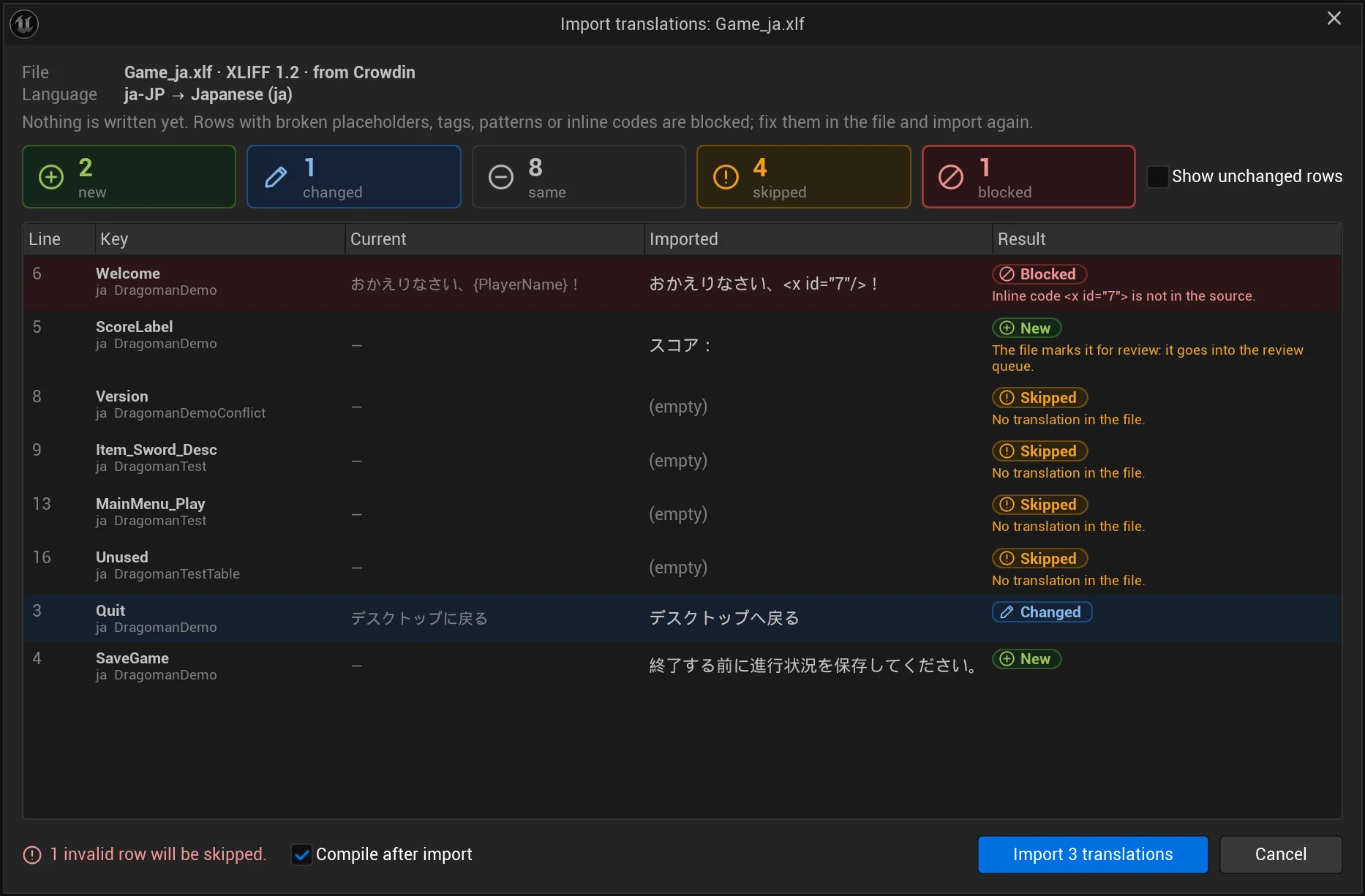
Translators’ files come back through a dialog that shows every new and changed text; broken rows are blocked. Machine translations wait in a review queue, riskiest first.
Inside the editor, without a separate process. The new text is in the editor and the game right away.
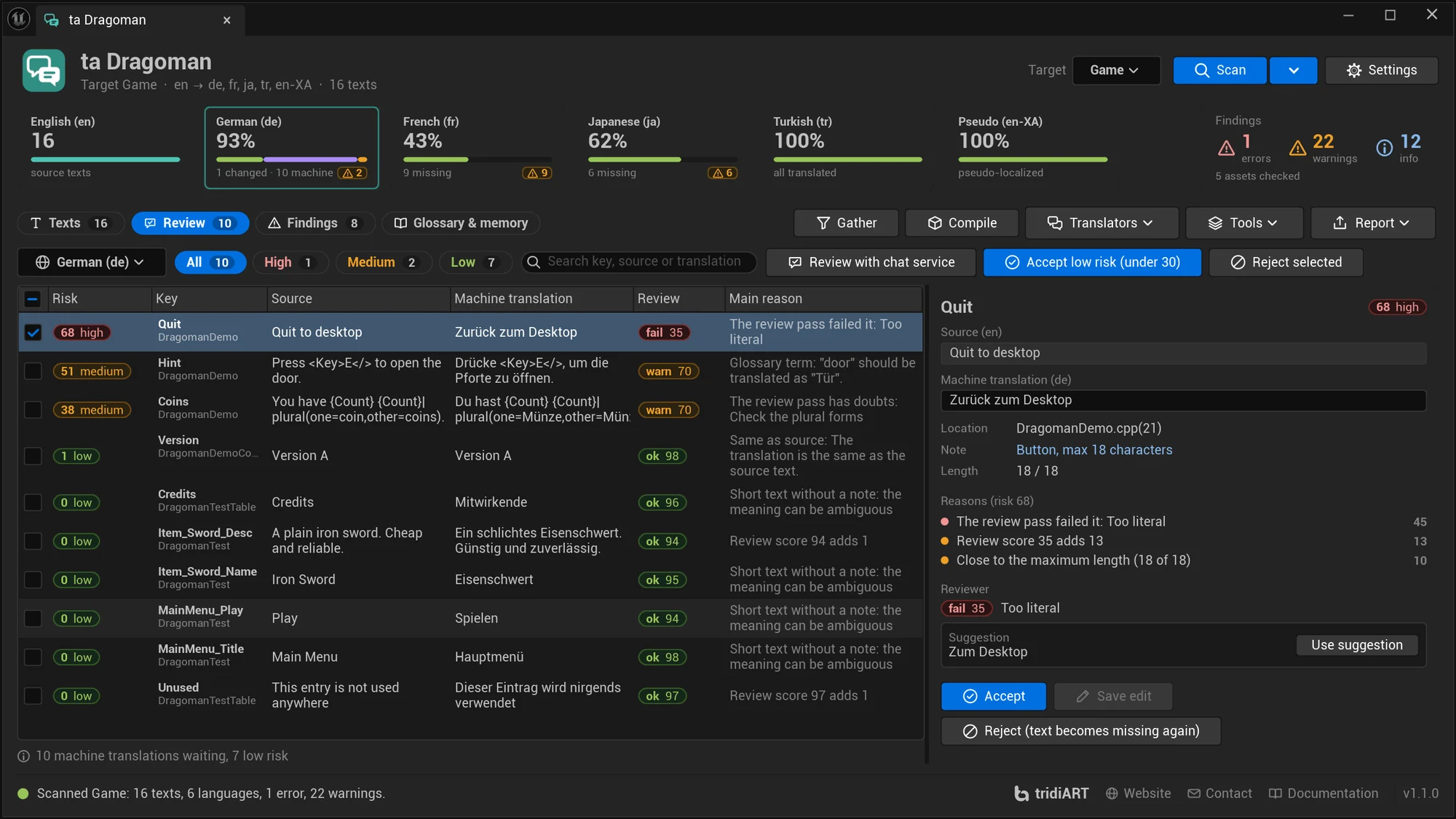
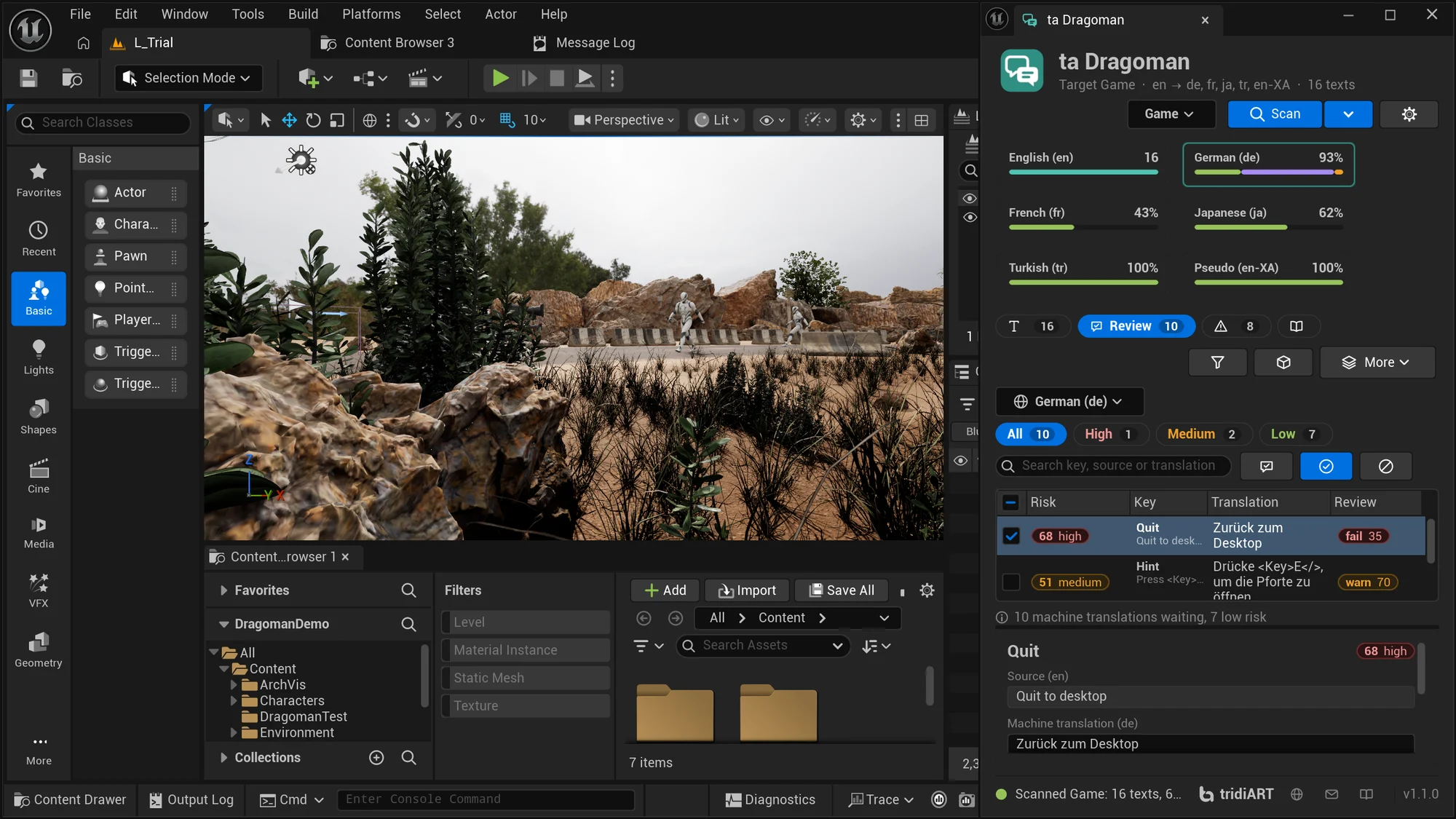
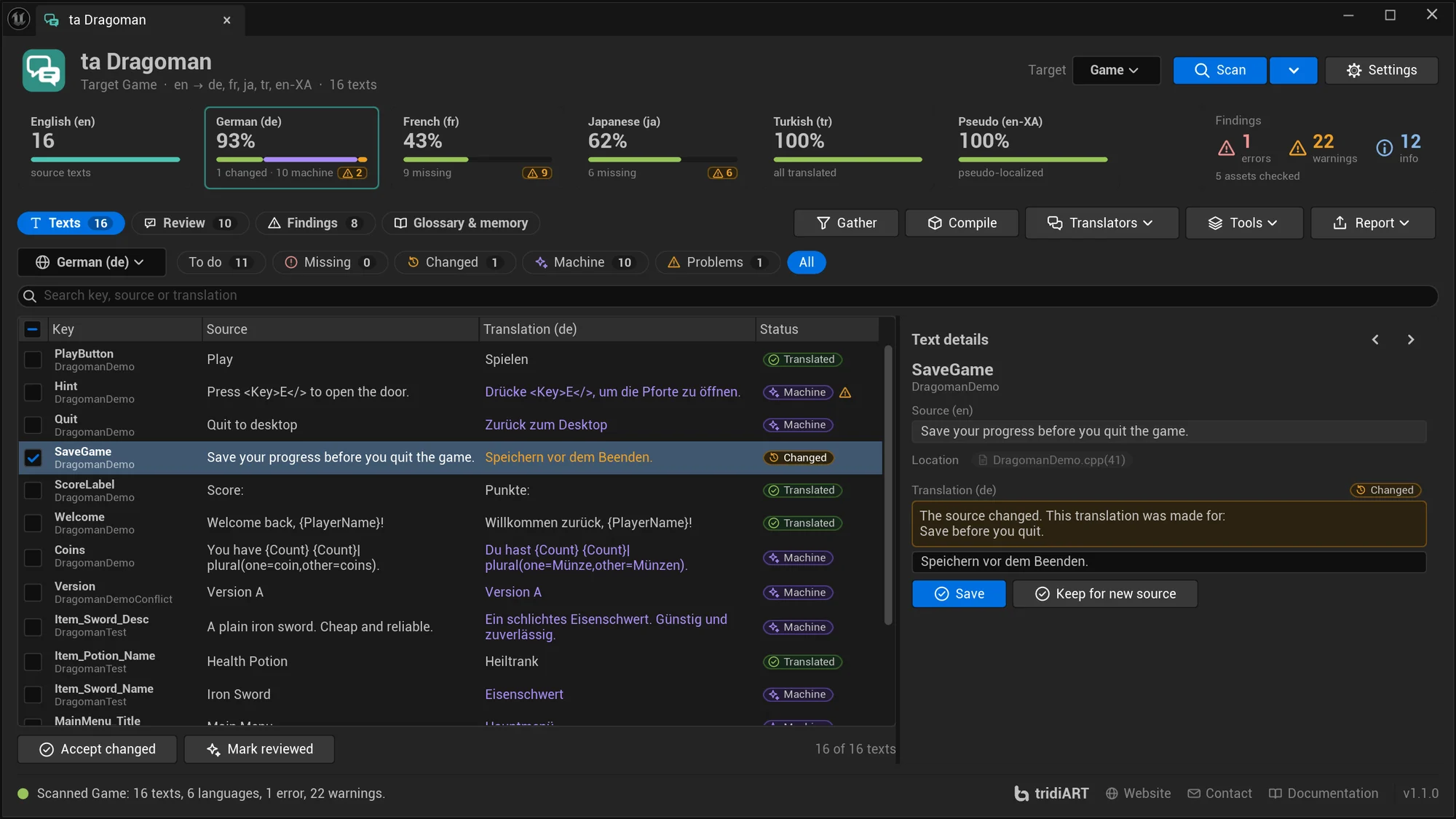
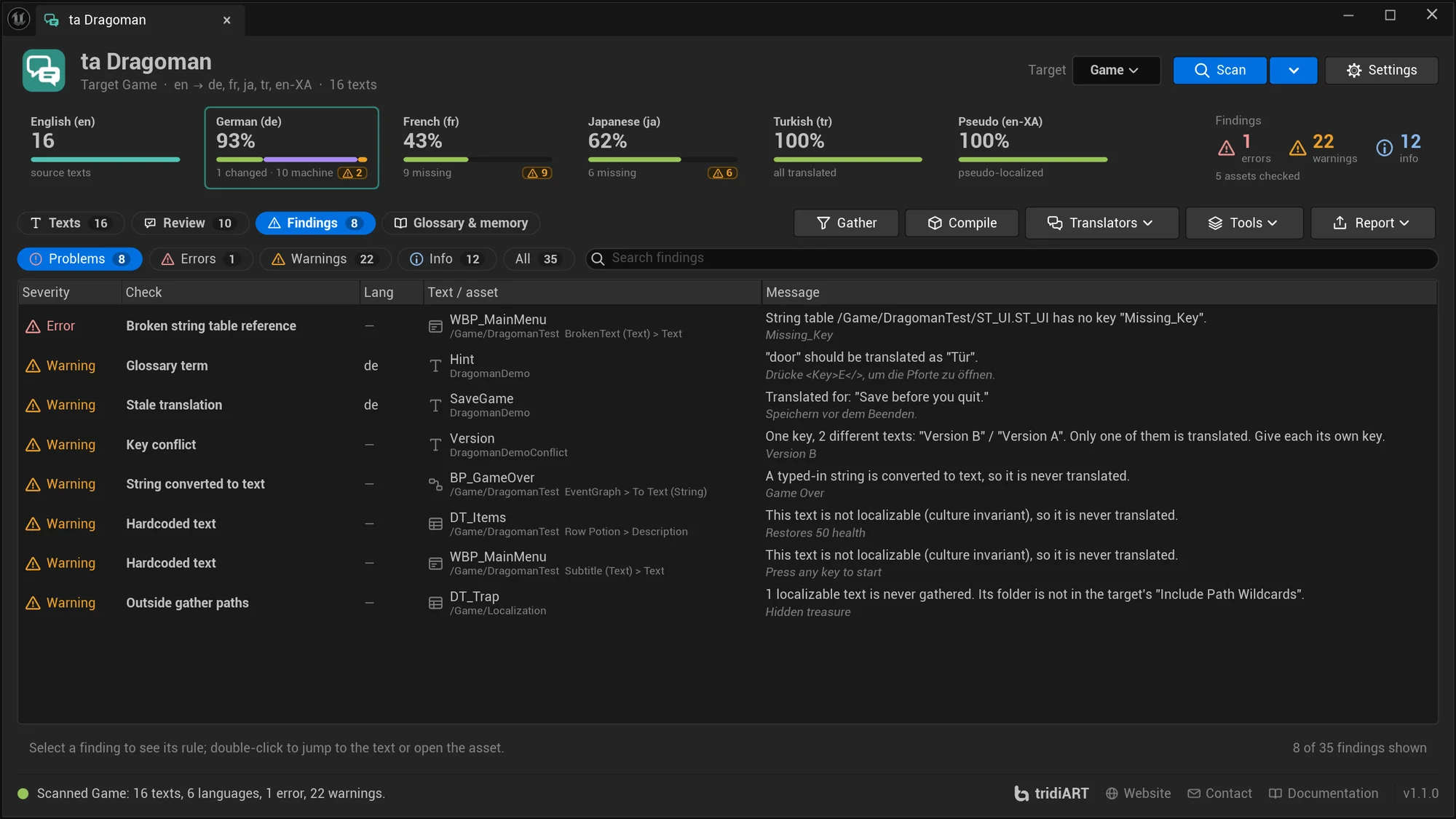
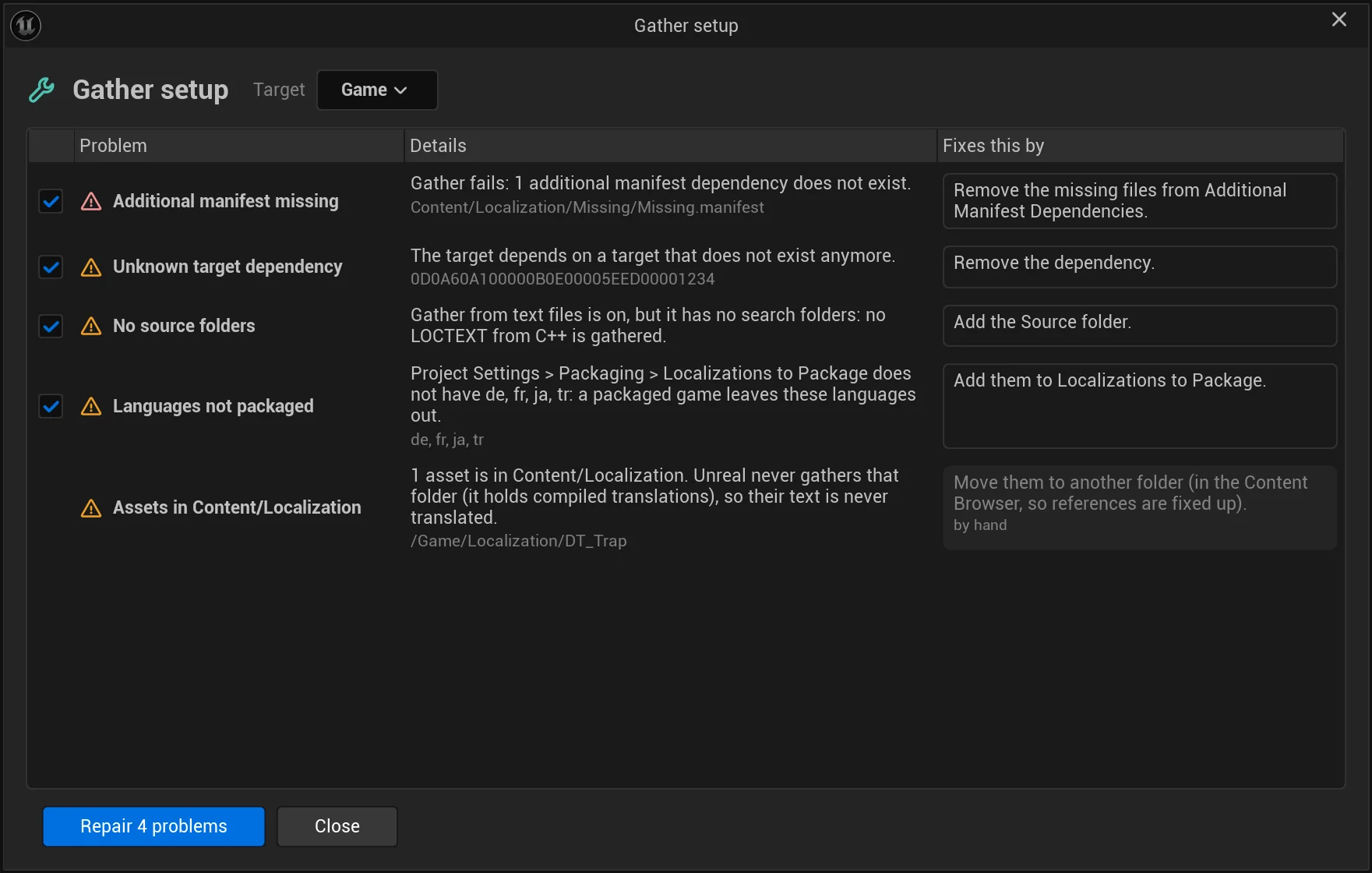
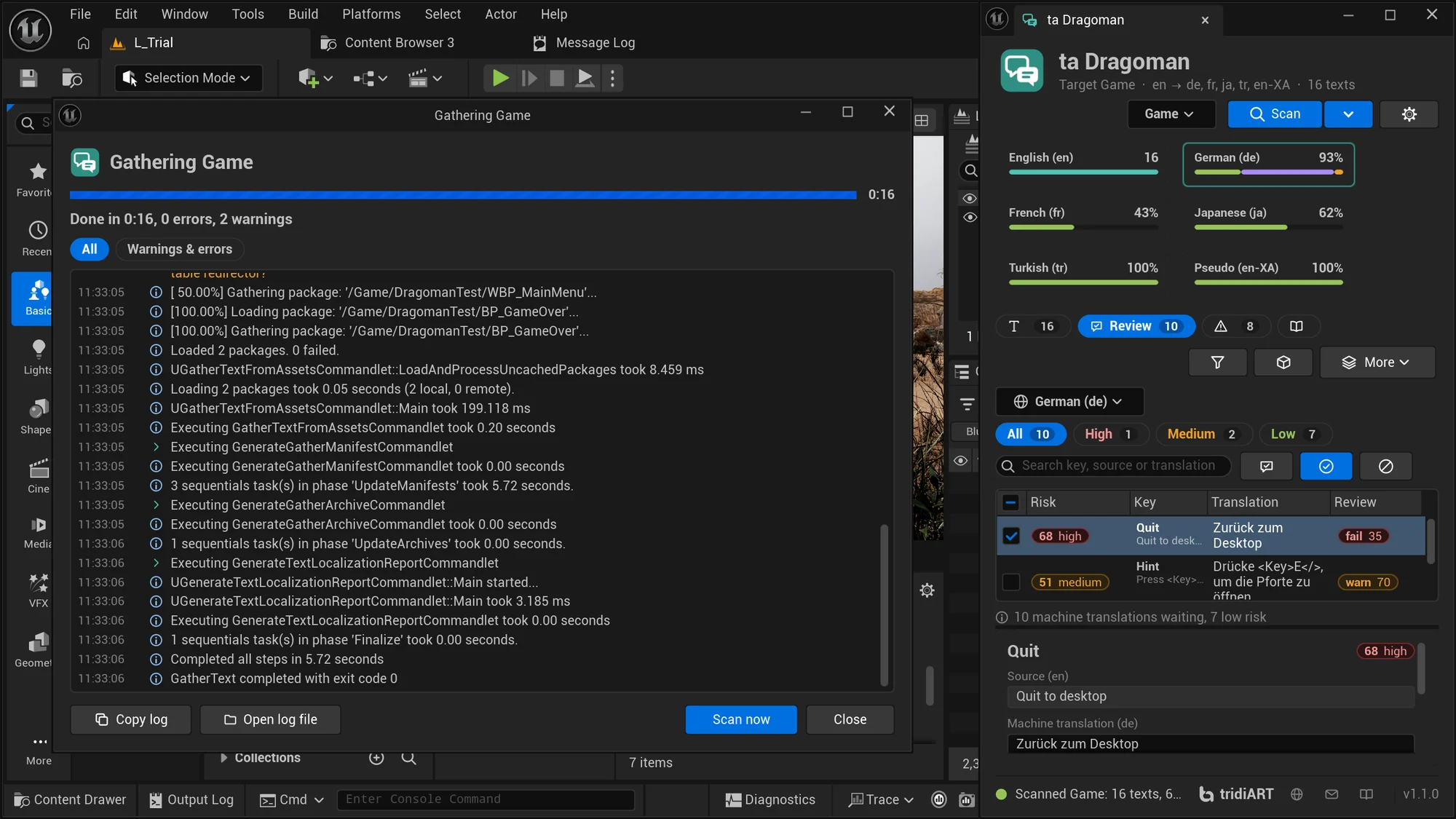
A card per language with its coverage, and a table with key, source, translation and status. Filter by what is missing, changed, machine-translated or broken, and click through to the asset a text comes from. Docked narrow next to the viewport, the panel keeps it all in one column.
Machine translations sorted by risk, with the reasons. An optional review pass adds a verdict, a score, the issue and a better translation. Accept the low-risk ones in one go.
A missing engine manifest, a dependency on a deleted target, no source folders, languages missing from the package: found, explained and fixed when you ask.
Translations made for an older source, next to the text they were made for. Keep them with one click, or update them.
CSV, an Excel workbook, PO, or XLIFF 1.2 / 2.0 for translation tools, with placeholders and tags as protected inline codes. Every text with where it is used, a note, a maximum length and glossary terms.
See every new and changed translation before anything is written. Rows with broken placeholders, tags, patterns or inline codes are blocked; texts the tool marks for review go into the review queue.
Plain project files you commit. The memory keeps every translation it has seen, suggests translations and fills repeated texts.
Dragoman reads your UI fonts' own character maps, fallbacks included, and finds the characters that would show as boxes.
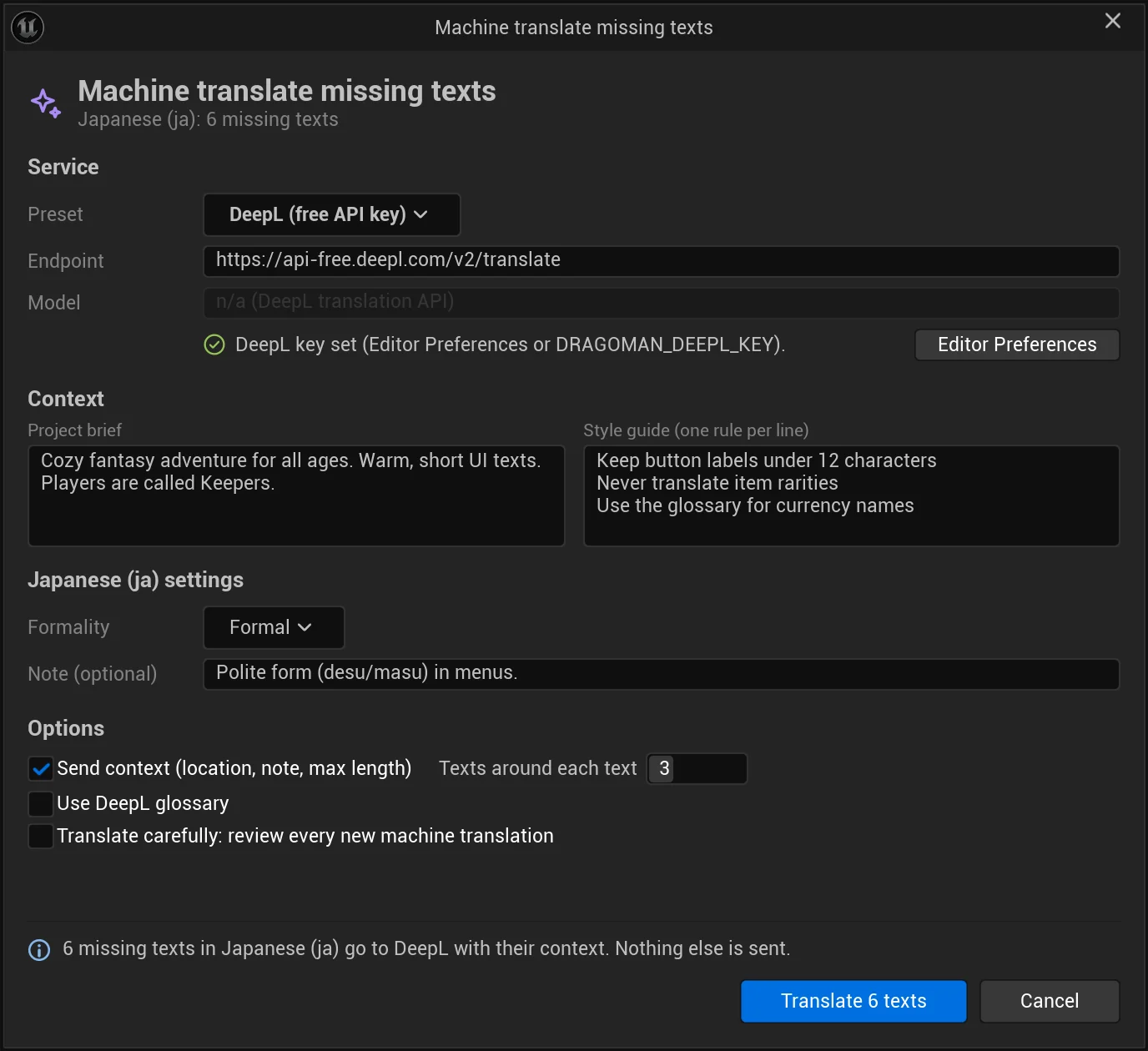
DeepL or the AI service of your choice, in the cloud or running locally, with your own key. Each missing text goes with its location, note, length limit and the texts around it, plus your project brief and style guide.
Unreal's Gather Text in its own process, with a progress bar per step, the live log with errors and warnings marked, hints for known errors and saved logs.
A commandlet with exit codes and HTML and JSON reports that can also repair the setup, gather, machine translate and review, Data Validation on save, and a Python and Blueprint API for your pipeline.
One click adds a pseudo language: every text accented, about 35% longer and in brackets, with placeholders, plural blocks and tags kept. Play in it, and cut-off, glued-together and hardcoded text stands out at once.
Pseudo-localization docsThe same algorithm as the plugin: accents on letters, padding words, brackets; {arguments} and <tags> stay as they are.
In the panel, in the commandlet and the reports; the asset checks also run in Data Validation when you save. Change a severity or turn a rule off in Project Settings. The gather setup problems have their own window, where one click repairs them.
MissingMissing translationWarningStaleTranslated for a source that changed sinceWarningMachineMachine translation (or a text a file marks for review) not reviewed yetInfoIdenticalTranslation equals the sourceInfoPlaceholderFormat arguments like {PlayerName} lost or addedErrorPatternUnreal’s format validation fails, e.g. plural forms the language does not haveErrorRichTagRich text tags like <Bold>…</> lost, added or brokenErrorWhitespaceSpaces or line breaks at the start or end differ from the sourceWarningLengthLonger than the note’s maximum, or much longer than the sourceWarningGlyphCharacters none of your UI fonts can drawErrorGlossaryA glossary term translated the wrong wayWarningDoNotTranslateA name that must stay as it is was changedWarningHardcodedTextText in widgets, Blueprints and tables that cannot be translatedWarningStringToTextA typed-in string converted with To TextWarningBrokenStringTableRefReference to a missing string table or keyErrorUnusedStringTableEntryString table entry no checked asset usesInfoNotInManifestTexts new or changed since the last gatherInfoOutsideGatherAssets with text the gather never seesWarningNoTargetThe localization target does not existErrorNotGatheredThe target has never been gatheredWarningNoForeignCultureOnly the native language is set upWarningEngineManifestMissingA target dependency has no manifest (the Engine target in some engine installs): Gather failsErrorCompileNeededTranslations changed after the last compileInfoConflictOne key with different source textsWarningThe real HTML report Dragoman wrote for its showcase project: coverage per language, every finding and every text in every language. Filter it, and switch your system to dark mode.
Run the commandlet on every build: it repairs the gather setup and gathers first, broken placeholders and missing glyphs fail it, texts still waiting for translators don't. When a translator's file comes back, import it from a script.
Command line docsUnrealEditor-Cmd.exe MyGame.uproject -run=TADragoman ^
-RepairGather -Gather -IgnoreMissing -FailOn=Error
rem A translator's file came back: preview it, then import and compile.
UnrealEditor-Cmd.exe MyGame.uproject -run=TADragoman ^
-Import=Translations/Game_ja.xlf -DryRunimport unreal
dragoman = unreal.get_editor_subsystem(unreal.TADragomanSubsystem)
report = dragoman.scan(True)
for c in report.cultures:
print(c.display_name, c.translated, "/", c.total, "-", c.words_to_do, "words to do")
folder = dragoman.export_package_as(["de", "fr"], "xliff", True) # XLIFF 1.2, to-do only
result = dragoman.import_translations("C:/In/Game_de.xlf", "", True, True) # dry run
print([(r.key, r.action, r.problem) for r in result.rows])
for item in dragoman.get_review_queue("de", True): # machine translations, riskiest first
print(item.risk, item.level, item.key, item.reasons)Sold on Fab under the Fab Standard License. Both licenses get the same plugin: every feature and the full C++ source, for Unreal Engine 5.0 – 5.8.
Dragoman is available on Fab now.
For individuals and companies with up to $100,000 in gross revenue in the last 12 months.
For companies with more than $100,000 in gross revenue in the last 12 months.
Need several seats or a studio agreement? Contact us.
The Fab Personal license is $19.99: individuals and companies with up to $100,000 in gross revenue in the last 12 months. Above that, the Professional license is $49.99. Both get the same plugin with every feature and the full C++ source.
No, it works with it. Your targets, gather settings and files stay where they are; Dragoman reads and writes the same manifest, archive and locres files, runs Gather and Compile for you, and repairs the setup problems that make Gather fail.
No. Packages are plain CSV, Excel, PO or XLIFF files you can send to anyone or load into your translation tool. Machine translation is optional and uses your own DeepL or AI service key, or a model running on your own PC.
The files of Dragoman’s packages, any CSV or Excel sheet with Key and Translation columns, PO files exported by the Localization Dashboard or by tools like Poedit and Crowdin, and XLIFF 1.2 or 2.0 files from translation tools.
Each machine translation gets points for its findings (a broken check counts most), a failed or doubtful review, plural forms, a length close to the maximum and short texts without a note. The riskiest come first, with the reasons. You decide: nothing is accepted until you accept it, one by one or the low-risk ones in one go.
Dragoman reads the character maps of the fonts you list (Unreal’s default UI font by default), including composite fonts with their fallback and sub-fonts, and reports the characters of a translation none of them can draw.
Only if you use machine translation or the review pass. Then the missing source texts (or the machine translations to review) go to the service you configured, with their context: location, note, maximum length, nearby texts, your project brief, style guide and the glossary terms they use. With a model on your own PC nothing leaves the computer. Nothing goes to tridiART.
Yes. The TADragoman commandlet runs the same checks, writes HTML and JSON reports and returns exit codes. It can also repair the setup, gather, export, import, pseudo-localize, compile, machine translate and review.
Unreal Engine 5.0 to 5.8, in the editor on Win64, Mac and Linux. Nothing of Dragoman is packaged into your game.